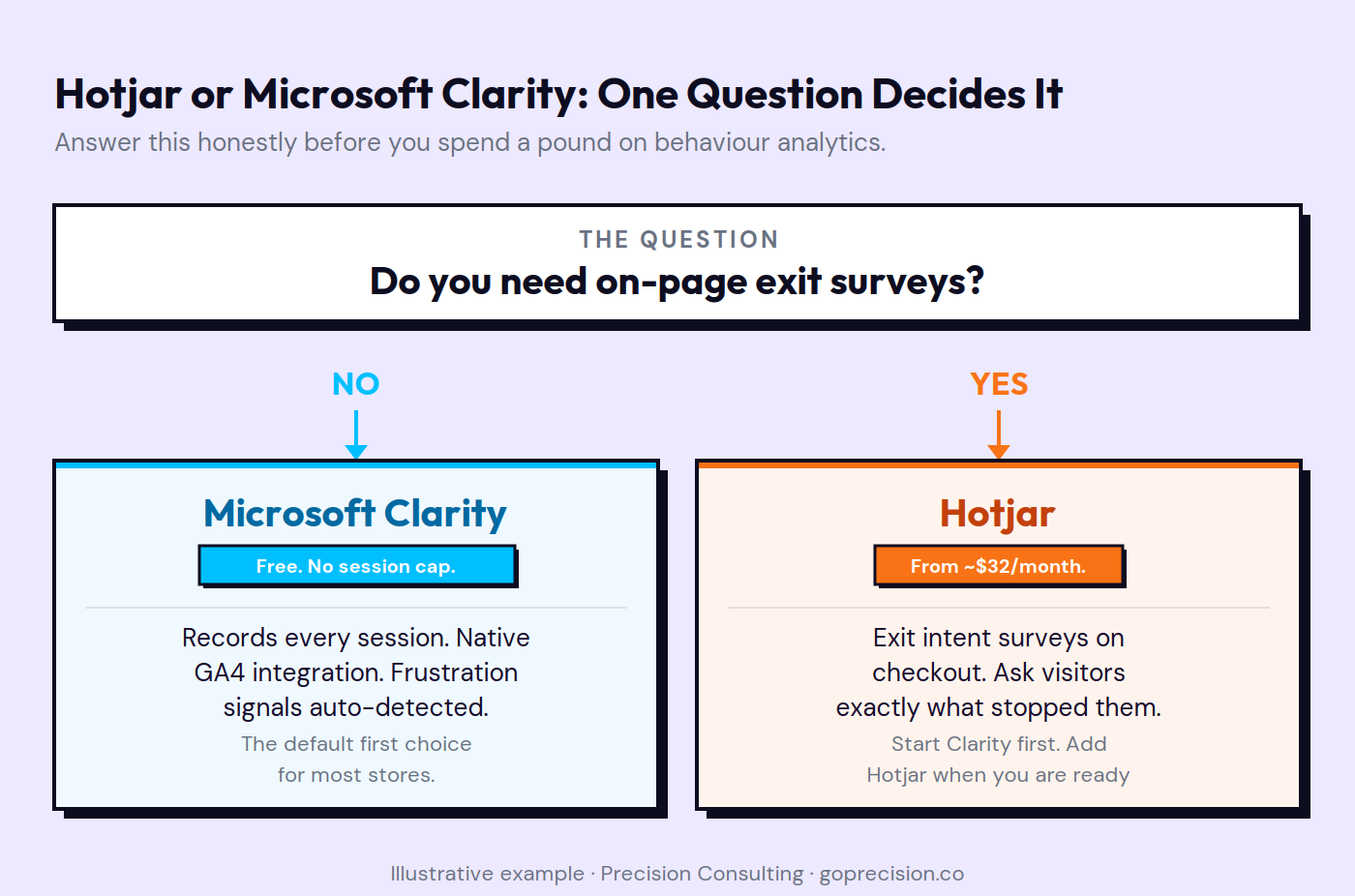
Hotjar vs Microsoft Clarity comes down to one question: do you need on-page surveys? If yes, Hotjar earns its cost. If not, Clarity does everything you need for free and, in most cases, does it with more data. That is the honest answer, and most comparisons bury it in a feature matrix nobody reads.
The mistake most stores make is building conversion hypotheses on Hotjar's free tier without realising that Clarity records everything for free. Using Hotjar's 35-session daily cap at meaningful traffic is like measuring a river with a teaspoon. A store with 5,000 daily visitors on Hotjar's free plan is capturing 0.7% of its traffic. Clarity gives them every session. If you want the methodology for acting on what you find once you have a tool, the heatmaps vs session replays guide covers that. This article is about which platform to pick and why.
What each platform actually does
Both tools collect heatmaps and session replays. Both install via a script tag. Both give you click maps, scroll maps, and the ability to watch individual visitor sessions. That is where the overlap ends.
Clarity is free. No session cap. No traffic limit. No paid tier. It integrates natively with GA4 by sending session data directly into your property as events. It was built to be the free behaviour layer that sits alongside GA4, and in practice that is exactly how it functions.
Hotjar is a paid platform that wraps session replays and heatmaps around on-page surveys, exit intent triggers, and NPS tools. Free tier: 35 sessions per day. Paid plans from approximately $32 per month. The surveys are the reason to buy it. Everything else Clarity covers for free.
Why Microsoft Clarity wins on sessions, speed, and GA4 integration
Unlimited sessions at zero cost
This is the most consequential difference in practical terms. Clarity records every session. Hotjar's free tier records 35 sessions per day. At any meaningful traffic volume, 35 sessions a day is not a sample. It is a skewed slice.
In a Precision audit on a DTC apparel brand running 3,000 daily visitors, the team had been using Hotjar's free tier for four months. They had 4,200 recordings. Clarity would have given them 360,000. The checkout friction pattern they had identified in the Hotjar data looked very different once we had a representative sample. The problem was real. The scale was completely wrong.
Native GA4 integration
Clarity sends session data directly into GA4 as custom events. You can segment Clarity recordings by GA4 dimensions: traffic source, device category, new vs returning, specific funnel step. If GA4 shows a 45% drop-off at checkout initiation, you can click through from GA4 directly into Clarity recordings of those exact sessions.
Hotjar integrates with GA4 but requires additional manual configuration. The native Clarity approach creates a seamless diagnostic workflow without engineering time to set up. For most stores, this is why Clarity is the default first behaviour tool.
Rage clicks, dead clicks, and frustration signals
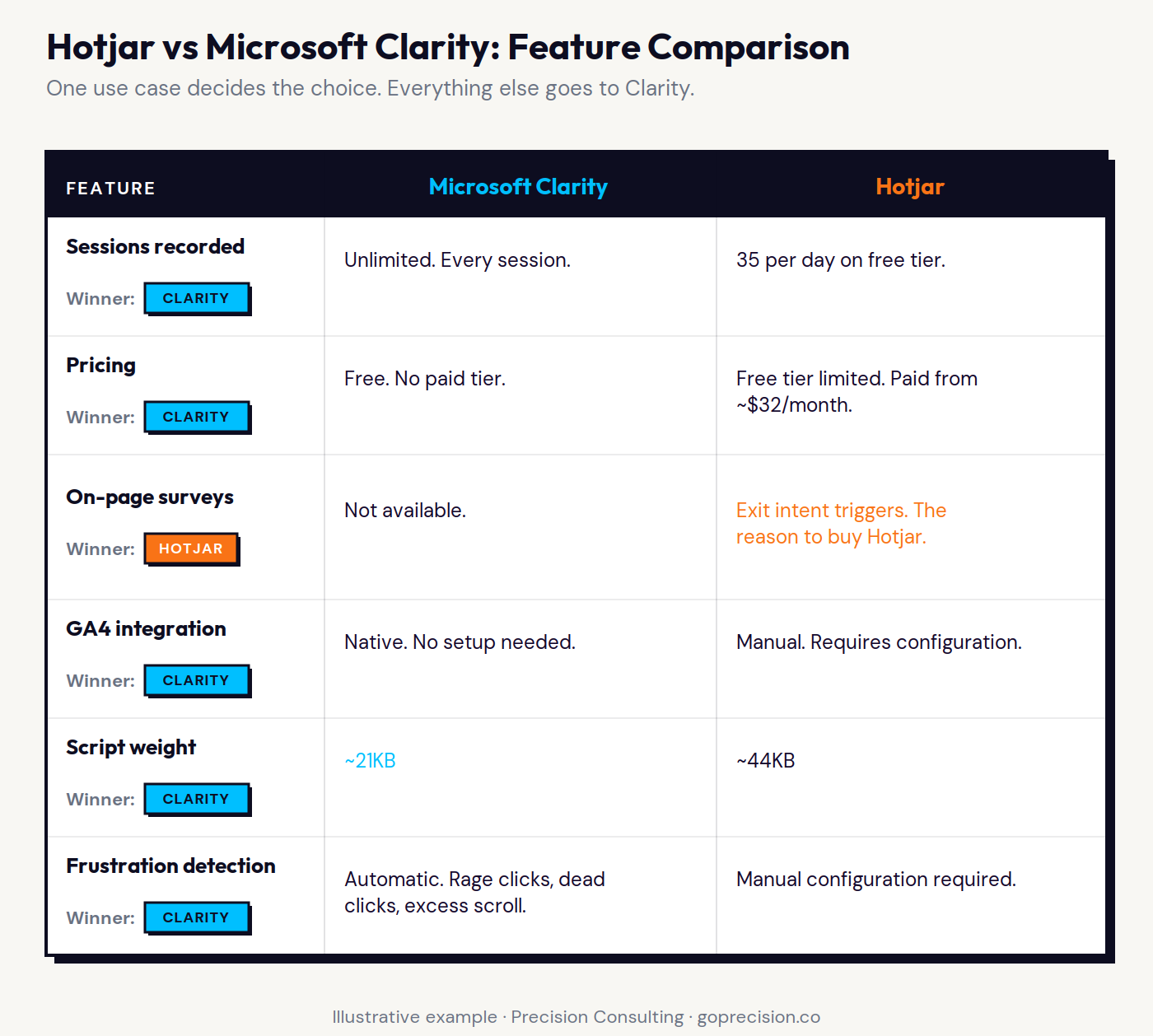
Clarity auto-detects three frustration signals and surfaces them as filters immediately: rage clicks, dead clicks, and excessive scrolling. No configuration required. Hotjar requires manual setup for the equivalent. In Clarity, filtering for rage clicks on your product page and cart takes five seconds. You will often find the pattern you need within the first ten recordings, not because the pattern was rare, but because nobody had looked for it before.
Script weight and page speed
Clarity's tracking script is approximately 21KB. Hotjar's is approximately 44KB. Both add load time, but Clarity adds roughly half as much. For stores already managing multiple scripts, GA4, Meta Pixel, email platform, and chat widget, the difference compounds. Page speed is a conversion metric. Every script adds to the total, and the total has a measurable effect on checkout conversion rate.
Before evaluating either tool: check how many sessions Hotjar is currently capturing versus your actual daily traffic. At 5,000 daily visitors, 35 sessions is 0.7%. Install Clarity and run it alongside for 48 hours. Compare the session counts. The decision usually makes itself.
Why Hotjar still earns its cost in one specific case
On-page surveys with exit intent triggers
This is the only reason to pay for Hotjar if you already have Clarity. The on-page survey feature lets you trigger a single question at exit intent on any page. For the checkout page specifically, this is one of the highest-value data sources in e-commerce CRO.
The question is always the same: what stopped you from completing your order today? The answers are always specific. Shipping cost appeared too late. Could not find the right size. Preferred payment method was missing. Wanted to think about it before committing. Clarity cannot ask this question. Hotjar can.
In work at Precision, checkout exit survey data has changed the diagnosis in nearly every engagement where we have it. Heatmaps tell you where people stopped. Recordings show you what they were doing when they stopped. The survey tells you why they decided to stop. All three together give you a complete picture. The survey answers are the fastest signal. People will tell you exactly what went wrong if you ask at the right moment.
Peak-End Rule (Kahneman): people remember an experience primarily by its most intense moment and its final moment. A checkout exit survey catches the visitor at their final moment with your store, when their reason for leaving is most salient and most accurately recalled. This is why exit timing produces more honest and specific responses than post-visit email surveys, which suffer from memory reconstruction and reduced emotional intensity.
Better filtering on paid tiers
Hotjar's paid tiers include segment-based filtering that lets you build complex recording views: users who visited more than three pages, spent more than two minutes, added to cart but did not purchase, came from a specific traffic source. Clarity's filtering is solid and includes the automatic frustration signal tags, but Hotjar's paid filtering options are more granular for teams running structured recording review sessions at high volume.
The filtering advantage is real. It is also irrelevant until you are running structured recording reviews at high volume. Most growth-stage stores are not at that stage. Clarity's filtering covers everything they need.
Hotjar AI on higher tiers
Hotjar's higher paid tiers include an AI feature that generates transcripts and summaries from session replays and aggregates survey responses into theme clusters. For teams reviewing high volumes of recordings or survey responses, this reduces manual synthesis work. It is not a reason to choose Hotjar over Clarity at the growth stage. It is a feature that matters at scale.
Hotjar vs Clarity compared across the five variables that matter for most e-commerce stores: sessions, pricing, surveys, GA4 integration, and script weight.
Knowing which platform to install is one thing. Knowing how to read the data once it starts collecting is another. If you want a clear view of which behaviour tool fits your current diagnostic needs, request your free audit and we will walk through your behaviour data together.
How the features and pricing compare
Sessions and pricing
Clarity is free, unlimited sessions, no paid tier. Hotjar's free tier is limited to 35 sessions per day. Paid tiers start at approximately $32 per month for higher session volumes and unlock survey features. The pricing scales with session volume and feature access. At 50,000 monthly sessions, Hotjar's equivalent paid plan runs at approximately $80 to $100 per month.
The pricing gap is material. A store choosing Hotjar over Clarity for recordings and heatmaps alone is paying for something Clarity provides for free. The only justification for that spend is the survey feature.
GA4 integration
Clarity sends events directly into GA4 without configuration. Hotjar requires manual setup. For the workflow of clicking from a funnel drop-off into recordings of that specific step, Clarity's native integration is the practical choice for most stores.
Heatmaps and recording quality
Functionally comparable for most stores. Both produce click maps, scroll maps, and session replays with reasonable playback quality. Neither platform has a meaningful quality advantage in the core recording feature. The decision is not about recording quality. It is about session volume, pricing, and the survey question.
Platform compatibility
Both install via a script tag that works on any platform. Clarity has a native Shopify app. Hotjar has a Shopify integration. Both install cleanly on WooCommerce via a plugin or manual script injection. Platform compatibility is not a differentiating factor for either tool.
Which platform should you use for your store
Use Microsoft Clarity if:
You need session replays and heatmaps at any traffic level: Clarity is the default first behaviour tool for most stores. There is no traffic threshold before it becomes useful.
GA4 is central to your diagnostic process: the native integration removes setup friction and creates a seamless click-through from funnel data to recordings of that specific step.
You want unlimited session data: no session cap, no traffic limit, no paid tier to manage or upgrade.
Page speed is a concern: you are already running multiple scripts and every additional KB of tracking code has a measurable effect on conversion.
You have no current use case for on-page surveys: Clarity covers everything else for free.
Use Hotjar if:
You want to run a checkout exit survey: this is the primary use case. One question at exit intent on the checkout page asking what stopped the visitor from completing their order. Clarity cannot do this.
You need NPS surveys or on-page satisfaction feedback: as part of a structured CRO programme where qualitative direct feedback is the diagnostic goal.
Your traffic volume makes granular paid filtering valuable: structured recording reviews at high volume where segment-based filtering changes the review process.
You are running a high-volume survey programme: and the Hotjar AI summary feature reduces meaningful manual synthesis time.
Running both
The best CRO tools guide and the heatmaps vs session replays guide on this site make the same point: do not run two behaviour tools simultaneously. Pick one source of truth. Running both adds script weight from each, creates data that does not always agree, and means time spent reconciling two dashboards instead of reading one properly.
The practical recommendation: start with Clarity. It covers everything until you have a specific reason to add the survey feature. When you are ready to run a checkout exit survey, either migrate to Hotjar entirely or add Hotjar on the checkout page only, with Clarity handling everything else. Not a tool problem. A sequencing decision. Get the sequence right.
The sequencing: install Clarity today alongside GA4. Let it collect data for two weeks before you start reading it. Use the native GA4 integration to create a filtered view of recordings from your primary funnel drop-off step. When you are ready to run a checkout exit survey, that is the moment to evaluate Hotjar's paid tier. Not before.
The decision framework for Hotjar vs Clarity. For most stores, the path leads to Clarity unless a specific survey use case exists.
Precision works with growth-stage e-commerce brands to build behaviour analytics programmes that produce real diagnostic insight rather than unread dashboards. If you want to understand which tool fits your store's current stage and how to get the most from it, book a call and we will walk through your behaviour data together. Or start with the full audit process to see what a structured CRO review looks like before committing.
Further Reading
Don't Make Me Think by Steve Krug covers the usability principles that make session recording analysis productive. Understanding what qualifies as friction and what qualifies as expected navigation makes the difference between watching recordings and learning from them.
Thinking, Fast and Slow by Daniel Kahneman covers the cognitive biases that distort how we interpret behaviour data, including why vivid individual recordings are remembered more than quiet successful sessions and why exit surveys produce more accurate answers than post-visit recall.
Key Takeaways
Hotjar vs Clarity comes down to one question: do you need on-page exit surveys? If yes, Hotjar earns its cost. If not, Clarity does everything you need for free.
Clarity records unlimited sessions at zero cost. Hotjar's free tier records 35 sessions per day. At any meaningful traffic volume, 35 sessions a day is not a sample. It is noise.
Clarity integrates natively with GA4. Hotjar requires manual setup. For the workflow of clicking from a funnel drop-off into recordings of that specific step, the native integration is the practical choice.
Hotjar's checkout exit survey is the single highest-value data source in e-commerce CRO. One question at exit intent: what stopped you from completing your order today? People will tell you exactly what went wrong.
Clarity's script is approximately 21KB. Hotjar's is approximately 44KB. Page speed is a conversion metric. Script weight compounds across every tool you install.
Rage clicks, dead clicks, and excessive scrolling are automatically detected and tagged in Clarity. No configuration required. Filter for them on your product page and cart within the first week.
Do not run both simultaneously. One source of truth for behaviour data beats two half-read dashboards. Start with Clarity. Add Hotjar when you have a specific survey use case that requires it.
Most stores do not need Hotjar's paid tier. The exception is a store actively running a checkout exit survey programme as part of a structured CRO process.
Frequently asked questions
Is Microsoft Clarity better than Hotjar?
For most stores, Clarity is the better starting point. It is free, records unlimited sessions, and integrates natively with GA4. Hotjar's advantage is on-page surveys, specifically an exit intent survey on the checkout page. If you need that feature, Hotjar earns its cost. If you do not, Clarity covers everything for free.
Is Hotjar free?
Hotjar has a free tier limited to 35 sessions per day. Paid plans start at approximately $32 per month and unlock higher session volumes and the survey feature. Microsoft Clarity is completely free with no session cap and no paid tier.
Can Microsoft Clarity replace Hotjar?
For session replays and heatmaps, yes. Clarity matches Hotjar's core behaviour analytics functionality at no cost and with higher session volume. Clarity cannot replace Hotjar's on-page survey and exit intent trigger features. If your CRO programme includes exit surveys, Hotjar remains the choice for that specific use case.
Does Microsoft Clarity work with Shopify?
Yes. Clarity has a native Shopify app and also installs via a script tag or theme code injection. It integrates with GA4 natively, which is particularly useful for stores already using GA4 Enhanced Ecommerce tracking. Hotjar also works with Shopify through a native integration.
How many sessions does Clarity record?
All of them. Clarity has no session cap and no traffic limit. It records every session from every visitor. This is its most significant practical advantage over Hotjar's free tier, which is limited to 35 sessions per day regardless of your actual traffic volume.
Should I use Hotjar and Clarity at the same time?
No. Running two behaviour tools simultaneously adds script weight from both, creates data that does not always agree, and means time spent reconciling two dashboards instead of reading one properly. Start with Clarity. Add Hotjar when you have a specific use case, most likely the checkout exit survey, that Clarity cannot fulfil.
What is Hotjar used for in CRO?
Hotjar is primarily used for three things in e-commerce CRO: session replays to diagnose funnel drop-off, heatmaps to understand page-level attention patterns, and on-page surveys to collect direct visitor feedback. The survey feature, particularly an exit intent trigger on the checkout page, is Hotjar's most distinctive contribution to a CRO toolkit and the primary reason to pay for its mid-tier plans.
Ammarah helps growth-stage e-commerce and SaaS brands increase revenue through psychology-driven CRO and UX strategy. With over a decade of experience across major tech platforms in Asia and the Middle East, she combines behavioural psychology with conversion data to identify and fix the specific points where browsers become buyers.
Weekly CRO Notes
The Mailer
Never miss an insight
Weekly CRO breakdowns and the tactics seven-figure e-commerce brands are using right now.