

Last updated:
The best CRO tools for e-commerce are not the ones with the longest feature list. They are the ones you will actually use, in the right order, for the right problem.
Most stores that struggle with conversion do not have a tool gap. They have a sequencing problem. They install a behaviour tool before they have read a single line of funnel data, stare at a heatmap for twenty minutes, and then do not know what to do with what they are looking at.
In the work we do at Precision, we use four categories of tools: analytics, behaviour, testing, and surveys. What follows is what we actually recommend to clients, what we use over the alternatives, and when a tool is genuinely worth its cost versus when it is overkill.
Start at analytics. Add the others when the data tells you to. The sequence matters more than the tools.
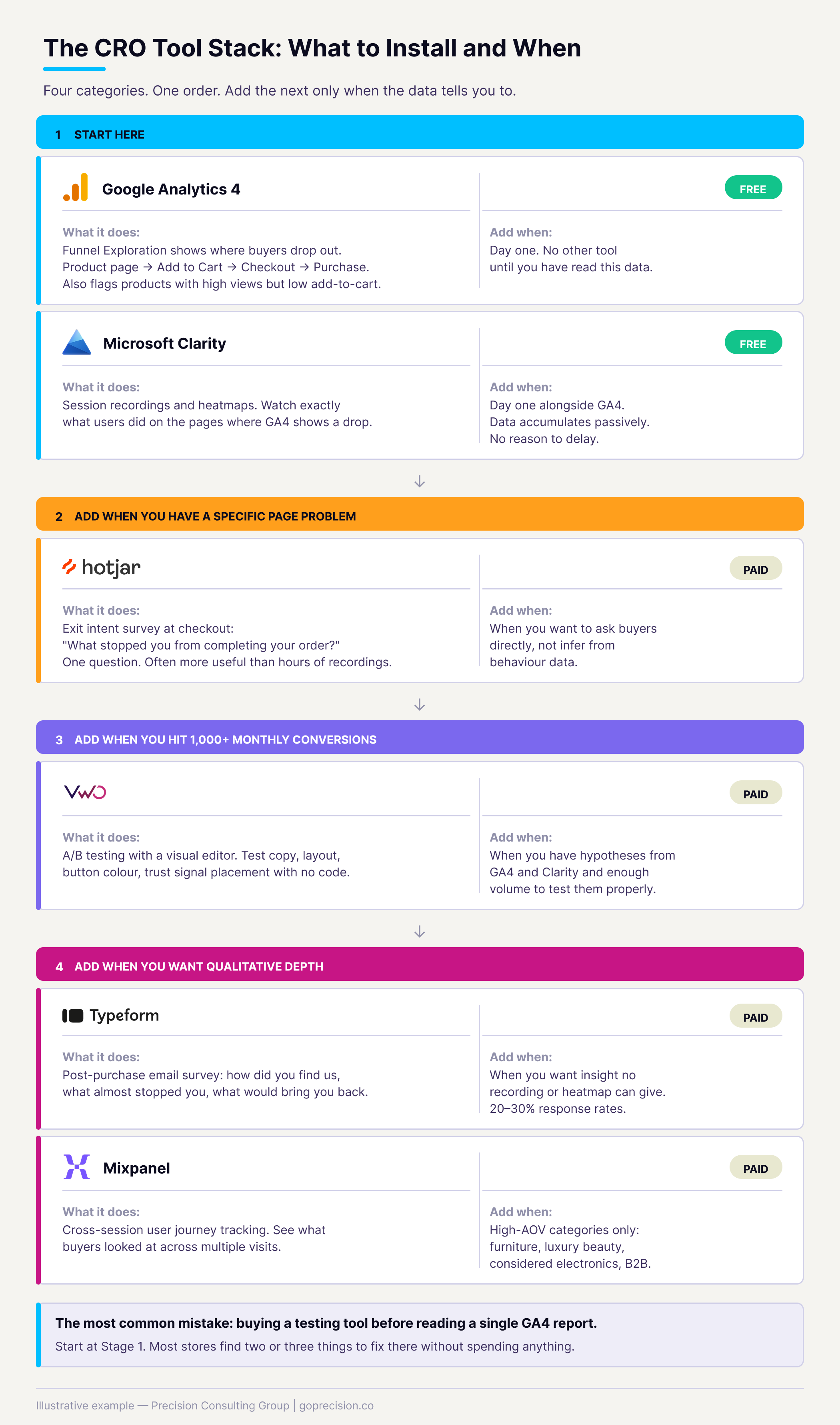
The four-category CRO tool stack for e-commerce. Start at analytics. Add each layer when the data tells you to.
Which analytics tools should you start with for e-commerce CRO?
You cannot fix what you cannot see. Before any behaviour tool or A/B test, you need funnel data that tells you where people are dropping out. That diagnosis determines everything that comes next.
Google Analytics 4
GA4 is where every e-commerce CRO programme starts. It is free, integrates natively with Shopify and WooCommerce, and gives you the funnel data you need to find your conversion problem before you spend money on anything else.
The report that matters most is the Funnel Exploration report. Build a funnel from product page view to Add to Cart to checkout initiation to purchase. Find the step with the biggest percentage drop and work from there. Everything else is secondary until you know where the problem actually is.
GA4 also surfaces which products have a high view rate but a low Add to Cart rate. That ratio tells you which product pages have a conversion problem, as opposed to a traffic or visibility problem. These are different problems with different fixes. The CRO audit checklist walks through how to act on this data once you have it.
The Fogg Behavior Model predicts that even a highly motivated buyer will not convert if the path to purchase creates too much friction. Funnel data identifies exactly which step is breaking that path, so you fix the right friction rather than guessing.
Install GA4 and enable Enhanced E-commerce tracking on day one. Set up a Funnel Exploration report from product view to Add to Cart to checkout to purchase. Read it for two weeks before installing any other tool. Most stores find two or three fixable problems in this data alone.
Mixpanel
Mixpanel tracks users across sessions rather than treating each visit independently. You can see that someone visited your store three times over two weeks before making a purchase, what they looked at on each visit, and where they stopped. GA4 treats each session separately, losing that continuity.
For most standard e-commerce stores, GA4 is sufficient. Mixpanel becomes worth the cost when your buying journey regularly spans multiple sessions. This is more common in certain categories: furniture and homeware, where buyers research for weeks before committing; luxury skincare and beauty, where a first visit is rarely a purchase visit; considered electronics or tech accessories at a higher price point; and anything where the buyer often needs to check with someone else before purchasing.
If your buyers typically purchase in one to three sessions and your primary goal is diagnosing funnel drop-off, GA4 covers everything you need. Mixpanel adds cost and engineering time that only pays off at high AOV in considered-purchase categories where mapping the multi-session journey actually changes what you build or how you communicate to buyers.
Which behaviour tools show you what visitors are doing on your pages?
Analytics tells you where people drop. Behaviour tools tell you what they were doing when they decided to leave. The two work together: you use analytics to identify the problem page, then behaviour tools to diagnose what is happening on it.
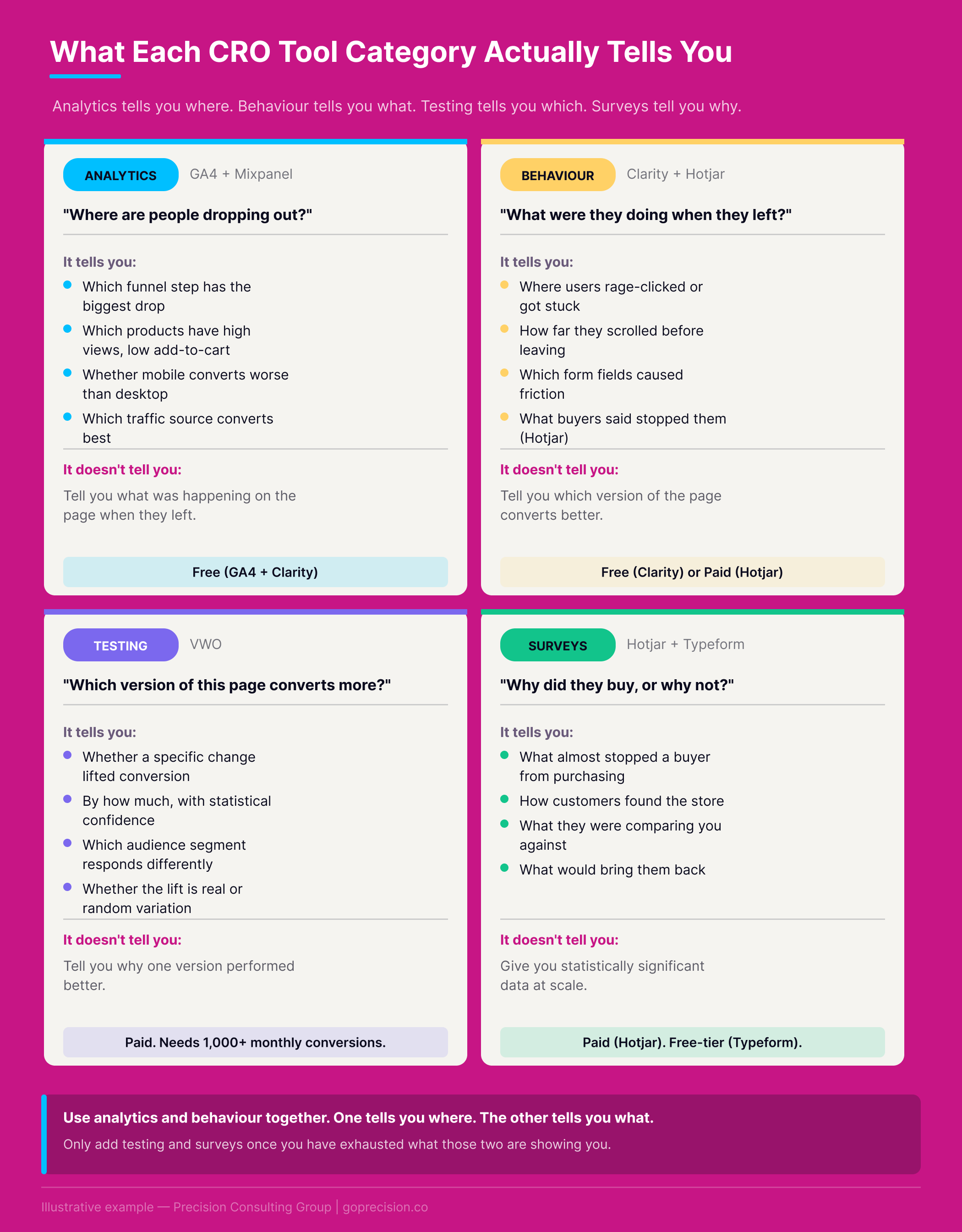
When to add each tool layer. The trigger is always data, not time elapsed or store size.
Microsoft Clarity
Clarity is free, integrates natively with GA4, and adds minimal script weight to your store. It gives you session recordings and heatmaps. For most e-commerce stores, it is all the behaviour data you will ever need.
The session recordings are where the real insight is. You can watch exactly what individual users did: where they clicked, where they hovered without clicking, where they rage-clicked, and where they stopped. Rage clicks are particularly useful because they often map directly to friction that is costing you conversions. A rage-clicked button that does not respond. A form field fighting autocorrect. A shipping cost that just appeared.
Because Clarity integrates with GA4, you can click through from a funnel drop-off in GA4 directly to the Clarity recordings of sessions that dropped at that exact step. That workflow from data to diagnosis is the most efficient thing in the toolkit.
Cognitive tunnelling explains why buyers fixate on one element and miss others entirely. Session recordings reveal what users were focusing on when they decided to leave. No post-session survey can recover that information accurately, because memory reconstructs rather than replays.
Install Microsoft Clarity alongside GA4 from day one. It is free, and the data accumulates passively. Having two weeks of recordings already waiting when you start investigating a specific page saves significant time. There is no reason to start collecting this data late.
Hotjar
Hotjar was the default behaviour tool for e-commerce CRO for years. It still offers robust session recordings and heatmaps, and its paid plans include an on-page survey feature that integrates directly with session data. For recordings and heatmaps alone, Clarity is free and performs comparably. Hotjar earns its cost when you need the on-page survey feature specifically: an exit intent survey on your checkout page that asks buyers what stopped them from completing their order.
If you are actively trying to diagnose checkout abandonment, the checkout optimisation guide covers what those survey answers typically reveal and what to do with them. If you only need recordings and heatmaps, use Clarity and put the money toward testing.
Which A/B testing tools are worth the cost for e-commerce?
Testing tools are the most commonly purchased and least used category in CRO. Most stores buy a testing platform before they have the traffic volume to get statistically valid results, run one inconclusive test, and stop. Before you spend money on a testing tool, check your monthly conversion volume. You need roughly 1,000 conversions per month per variant to reach statistical significance within a reasonable timeframe. Below that, fix the obvious problems first. You will move faster and spend less.
VWO
VWO is the testing tool we use most often with clients. It has a clean visual editor that lets you test changes to copy, layout, button colour, and trust signal placement without writing code. For e-commerce CRO, that covers the majority of what you will want to test.
The statistical engine handles both frequentist and Bayesian testing. Frequentist testing tells you whether a result is statistically significant once the test has run to completion, and requires you to decide your sample size in advance. Bayesian testing continuously updates its confidence estimate as data comes in, making it more forgiving if you need to stop a test early or if your traffic is unpredictable. For most store owners without a statistics background, Bayesian is easier to act on.
VWO is not cheap. Once you are above 1,000 monthly conversions and have a backlog of hypotheses from your behaviour data, it pays for itself quickly. The A/B testing guide covers how to build that hypothesis backlog and what to test first.
Action bias is the tendency to act even when doing nothing is the better choice. Most stores install testing tools before they have the traffic volume to get meaningful results, driven by the urge to do something about their conversion rate. The result is inconclusive tests, wasted budget, and the false conclusion that testing does not work.
Before you buy a testing tool, count your monthly conversions. If you are below 1,000, fix known friction first. When you cross that threshold and have clear hypotheses from your analytics and recording data, VWO gives you a visual editor and statistical engine that does not require a statistics background to operate.
The ROI case for a testing tool: A testing platform costs between $200 and $2,000 per month. At 1,000 monthly conversions and an average order value of $80, your baseline is $80,000 per month. A single winning test that lifts conversion by 10% is worth $8,000 per month. The tool pays for itself in the first month a test wins.
Below that conversion volume, the same budget spent removing known friction from your checkout or product pages will almost always move faster.
What replaced Google Optimize
Google Optimize was discontinued in September 2023. There is no free replacement with equivalent GA4 integration. For stores that need a mid-tier option, Convert is worth considering. For Shopify specifically, the Online Store 2.0 theme editor allows some basic theme-level testing without a third-party tool. If budget is the constraint, prioritise removing known friction before spending money on testing unknown variants.
Which survey tools give you the fastest conversion insight?
Session recordings show you what people did. Surveys tell you why they did or did not do it. The data is qualitative, so you cannot aggregate it the same way, but it is often more direct than anything a heatmap can convey. The most useful survey in e-commerce CRO is a single question asked at checkout exit: "What stopped you from completing your order today?" People will tell you the shipping was too expensive, that they could not find their preferred payment method, or that they wanted to think about it more. The cart abandonment guide covers these root causes in detail. Hearing them directly from your own customers is a different level of confidence.
Hotjar for checkout exit surveys
Hotjar lets you trigger a survey on a specific page at exit intent. For the checkout page, this is the highest-value placement. You target only users who are leaving checkout and ask the one question that matters. The answers are stored alongside session recordings, so you can watch the recording of a user who said shipping was too expensive and see exactly where in the checkout process that decision was made.
Typeform for post-purchase insight
Typeform works better for post-purchase surveys than for on-page exit surveys. After a purchase is confirmed, a Typeform link in the confirmation email or on the thank-you page collects qualitative data about the buying journey: how they found you, what almost stopped them from buying, and what would bring them back.
A five-question Typeform survey sent to customers in the first week after purchase gives you richer insight into your conversion barriers than almost any quantitative tool. Customers who just bought from you are motivated to help. Response rates of 20 to 30% are realistic when the email timing is right.
Direct questioning reduces inference error. Watching a heatmap requires you to interpret what the visitor was thinking. Asking your buyers what stopped them removes that interpretation step and delivers the friction signal with far greater precision. The limitation is recall bias: post-session surveys are less reliable the longer you wait to ask.
Use Hotjar for the checkout exit survey: one question, exit intent trigger, checkout page only. "What stopped you from completing your order today?" Use Typeform for post-purchase email surveys that collect qualitative insight about the full buying journey. They serve different purposes and the data from each does not overlap.
How to build your CRO tool stack without overcomplicating it
The most common mistake is a store owner who has installed four CRO tools and has not read a single report from any of them. Every tool adds script weight, cost, and data to interpret. The question is not which tools are best in the category. It is which tools are right for where your store is right now.
Follow this sequence:
- Start here: GA4 and Microsoft Clarity. Both free. Together they cover the diagnosis phase: where the drop-off is and what is happening there. Install both, run for at least four weeks, and identify what to fix before adding anything else.
- Add when you have a specific checkout problem: Hotjar exit survey on the checkout page. One question. Exit intent only. Run it for four weeks and read every response.
- Add when you have 1,000+ monthly conversions: VWO for A/B testing. Not before. Build your hypothesis backlog from your analytics and recording data first.
- Add when you want qualitative depth: Typeform post-purchase survey to your confirmation email. Five questions maximum. Send within one week of purchase.
- Add when your buying cycle spans multiple sessions: Mixpanel, if you sell in categories where buyers research across multiple visits before committing.
Audit your installed tools quarterly. Every tool that is not generating data you are actively reading adds script weight and cost with no return.
If you want an outside perspective on which tools your store actually needs and in what order to use them, the work we do at Precision starts with exactly that diagnosis before any tool recommendation or implementation.
Hooked by Nir Eyal covers the Fogg Behavior Model and how friction in a product experience determines whether motivated users complete an action. Directly relevant to understanding what your behaviour data is showing you and why certain drop-off points recur regardless of traffic volume.
Predictably Irrational by Dan Ariely covers how and why people make irrational decisions. That is the underlying question every CRO tool exists to help you answer. Particularly useful context for interpreting survey responses that seem contradictory to what your heatmap data shows.
- Start with GA4 and Microsoft Clarity. Both are free and together they cover the diagnosis phase: where the drop-off is and what is causing it.
- Do not buy a testing tool until you have at least 1,000 monthly conversions. Below that, fixing known friction moves faster than testing unknown variants.
- The most valuable survey in e-commerce CRO is a single question at checkout exit: "What stopped you from completing your order today?" Hotjar delivers this. Clarity does not.
- Hotjar and Clarity overlap on recordings and heatmaps. Hotjar's advantage is on-page surveys. Clarity's advantage is being free.
- Google Optimize was discontinued in September 2023. VWO is the strongest replacement for e-commerce A/B testing at the paid tier.
- Mixpanel is worth the investment for high-AOV stores in categories like furniture, luxury beauty, or considered electronics, where buyers research across multiple sessions before purchasing.
- Post-purchase Typeform surveys sent within one week of purchase generate qualitative insight that no quantitative tool can replicate. Response rates of 20 to 30% are realistic when the email timing is right.
- Audit your installed tools quarterly. Every tool that is not generating data you are actively reading adds script weight and cost with no return.
Frequently asked questions
What are the best CRO tools for e-commerce?
The best CRO tools for e-commerce are Google Analytics 4 for funnel analysis, Microsoft Clarity for session recordings and heatmaps, Hotjar for on-page exit surveys, and VWO for A/B testing. Start with GA4 and Clarity. Both are free and together they cover the diagnosis phase for any store. Add paid tools when you have the traffic and conversion volume to justify them.
Do I need a paid CRO tool?
Not at first. GA4 and Microsoft Clarity are both free and cover the diagnosis phase for most e-commerce stores. Paid tools like Hotjar and VWO become worth the cost when you have enough traffic to generate meaningful behaviour data and enough monthly conversions, roughly 1,000 per month, to run statistically valid A/B tests.
How much traffic do I need before A/B testing makes sense?
A working rule is 1,000 conversions per month per test variant. Below that, tests take too long to reach statistical significance and the results are unreliable. Stores below this volume move faster by identifying and removing obvious friction points than by running formal tests.
Is Hotjar worth it for small e-commerce stores?
For session recordings and heatmaps, Microsoft Clarity is free and comparable to Hotjar. Hotjar earns its cost when you need the on-page survey feature, specifically an exit intent survey at checkout asking buyers what stopped them. If that survey is not part of your plan, use Clarity and save the budget.
What is the difference between frequentist and Bayesian A/B testing?
Frequentist testing tells you whether a result is statistically significant once a test has run to a predetermined sample size. You set the parameters in advance and wait. Bayesian testing updates its confidence estimate continuously as results come in, which makes it more practical if you need to stop a test early or your traffic is inconsistent. For most store owners without a statistics background, Bayesian is easier to act on.