Last updated:
There is a concept in Nir Eyal's Hooked that changed how I think about e-commerce. He describes BJ Fogg's model of behaviour: for an action to occur, three things must be present at the same time. A trigger (the reason to act), motivation (the desire to act), and ability (how easy it is to act). Remove any one of these and the behaviour does not happen.
Most e-commerce founders spend all their energy on triggers and motivation. More ads, better targeting, bigger discounts, flashier campaigns. But they completely ignore ability. They are paying to get people to the site, then making it unnecessarily hard for them to buy. This CRO audit checklist fixes the ability problem.
If your site converts at 1.5% instead of 3%, you are paying twice as much per customer. Not because your ads are not working. Because your site is actively preventing people from completing the action they came to do.
Every unnecessary form field, every hidden shipping cost, every confusing CTA is a friction point that Fogg's model predicts will kill the behaviour. This checklist is the 10 friction points we find in every single audit at Precision. Not theoretical best practices. Real problems on live sites, costing real businesses real revenue. Fix these before you spend another dollar driving traffic to a leaky funnel. This is also the core argument for why CRO comes before SEO at most stages: there is no point increasing the volume of visitors arriving at a page that does not convert the ones already there. If you are new to conversion optimisation, the guide to what CRO is gives the strategic context for why these items matter.
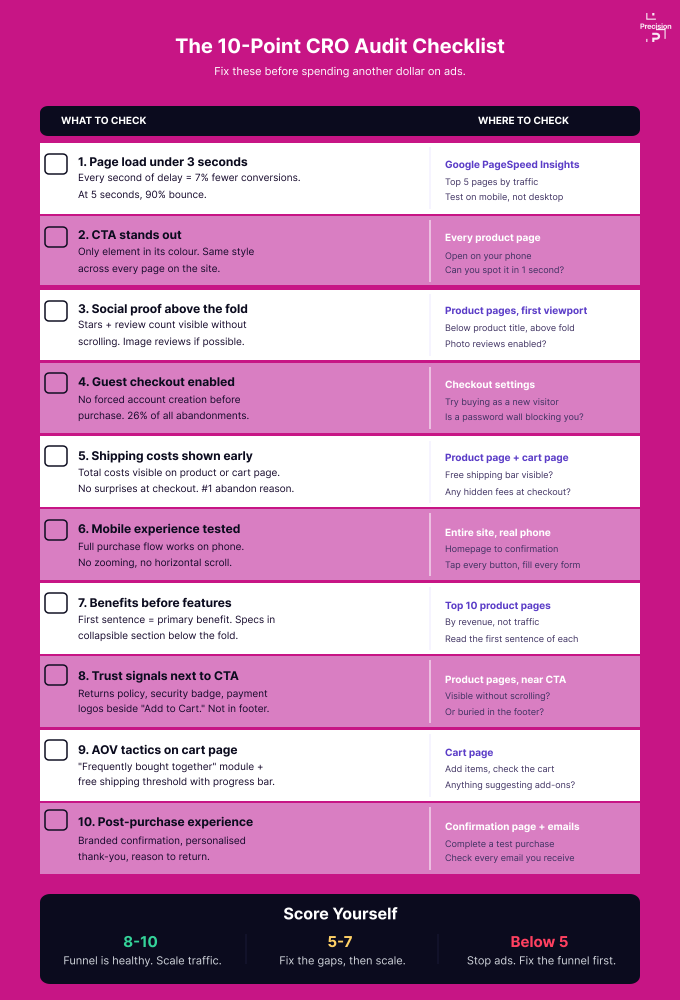
The 10-point CRO audit checklist at a glance: what to check, where to check it, and what good looks like.
1. Is your page load speed above 3 seconds?
A 1-second delay in page load reduces conversions by up to 7%, according to Deloitte's "Milliseconds Make Millions" research. At 3 seconds, bounce rates jump 32%. At 5 seconds, 90%, per Google's analysis of mobile speed and user behaviour. And since mobile accounts for 78% of retail site visits, this is overwhelmingly a mobile problem.
Think about it from the visitor's perspective. They tapped a link. They are waiting. Every second that passes, their brain is recalculating whether this is worth it. By 3 seconds, most have already moved on. Speed is not a technical nice-to-have. It is the first point of friction in the entire experience.
Run Google PageSpeed Insights on your top 5 pages right now. Compress images (the #1 culprit in almost every store we audit). Enable lazy loading for below-the-fold content. If your mobile load time exceeds 3 seconds, treat it as a revenue emergency, not tech debt.
2. Does your primary CTA stand out on every page?
Your primary CTA stands out enough if a first-time visitor can identify it within 1 second on mobile. If it blends in with surrounding elements, you have a problem. Open your product page on your phone right now. If you have to look for the "Add to Cart" button, your customer is having to look for it too. What stands out is what gets acted on.
We audited an e-commerce site where the "Add to Cart" button changed colour based on the selected product variant: blue product, blue button. Green product, green button. The CTA was literally camouflaging itself on every page. The user's brain could not build the pattern recognition needed to click without thinking.
Your CTA should be the only element on the page in its colour: same text, same colour, same style, every page. So the user's brain recognises it instantly without a second thought.
This article tells you what to check. Our kit of 9 fillable PDFs starts with a diagnostic that finds your leak, then gives you a checklist for each stage: homepage, product page, cart and checkout, trust, and speed and mobile. Get the kit on Etsy.
3. Do you have social proof visible above the fold?
Social proof above the fold is one of the highest-leverage trust signals on a product page. If your star rating, review count, or bestseller badge is buried below the fold, it is invisible at the moment of decision.
Social Proof: When people are not sure, they look at what other people did. Star ratings, review counts, "Bestseller" badges, customer photos. These are your most powerful trust signals. They do the selling for you because they come from someone who is not you.
But placement matters as much as existence. Social proof buried 3 scrolls down is functionally invisible when the customer is deciding whether to add to cart. The trust signal needs to be present at the exact moment of doubt, not somewhere they might scroll to later.
Place your star rating and review count directly beneath the product title, so they are visible without scrolling. If your platform supports image reviews, enable them. Shoppers who interact with customer photos convert at roughly double the rate of text-only review readers, according to Yotpo's e-commerce benchmarks.
4. Does your checkout force customers to create an account?
Forced account creation is the second most common reason for cart abandonment (26% of all abandonments, per Baymard Institute). Think about what you are actually asking: the customer has decided to buy, they have added it to the cart, and now you want them to create a password, verify an email, and set up a profile before you take their money. You have added three separate friction points at the worst possible moment.
The customer has already decided to buy. They have added it to the cart. And now you are putting up a registration wall between them and giving you money. That is not security. That is self-sabotage.
Enable guest checkout. Period. Offer account creation after the purchase is complete, once the customer has committed and the transaction is done. You capture the same data from the order anyway.
5. Do shipping costs appear for the first time at checkout?
Unexpected shipping costs at checkout are the single biggest reason for cart abandonment, accounting for 48% of all drop-offs. The surprise is the problem, not the amount.
The Pain of Paying: Unexpected costs at checkout are the #1 reason for cart abandonment, accounting for 48% of all abandonments, according to Baymard Institute's large-scale checkout usability research. The customer was in "I am getting this" mode, and you have just flipped them to "Wait, am I overpaying?" mode. Dan Ariely calls it the pain of paying. That emotional sting of feeling tricked is far more powerful than any rational calculation of whether the shipping cost is fair.
The surprise is the problem, not the amount. That $7.99 shipping charge does not just feel like a cost. It feels like you hid something from them. Once that doubt kicks in, you have lost most of them.
Show the total costs, including shipping, as early as possible. On the product page or at least on the cart page. No surprises at checkout. If you offer free shipping above a threshold, show the progress bar everywhere.
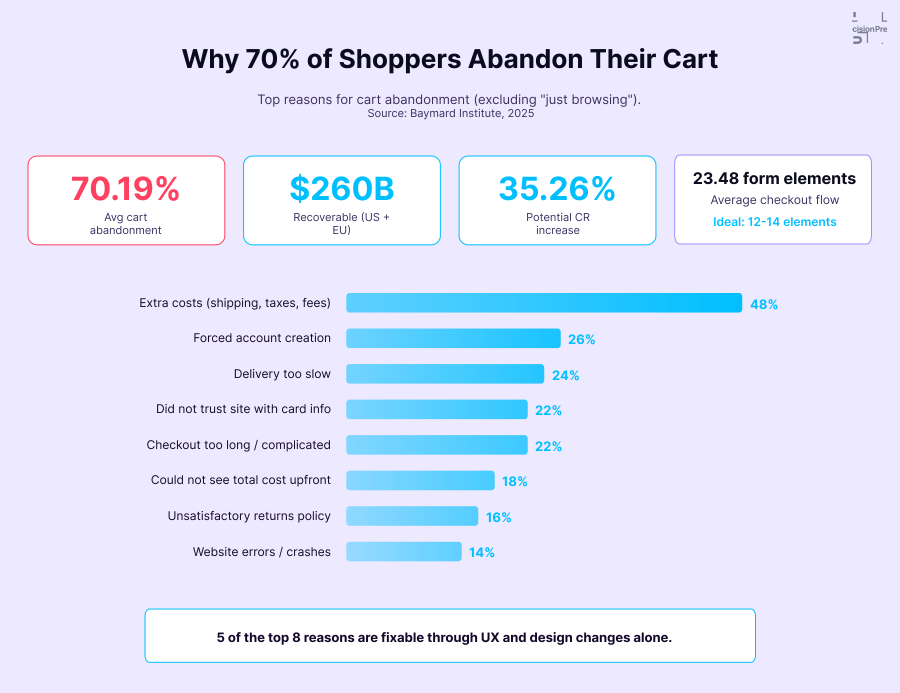
The top 5 cart abandonment reasons from Baymard Institute data, with the psychology behind each one and the specific fix.
6. Is your mobile experience built for mobile, or just shrunk from desktop?
Mobile accounts for 78% of retail site visits but converts at 1.8%, vs. 3.9% on desktop. Part of that gap is inherent (smaller screens, more distractions). But a major part is that most sites are designed for desktop and then shrunk. Buttons that were easy to click with a mouse become tiny tap targets. Forms that were quick on a keyboard become painful on a touchscreen.
If your mobile checkout requires precise finger taps on small links, typing long-form data into tiny fields, or navigating a menu built for hover states, you have made it physically harder to buy than it needs to be. And people do not fight through friction. They leave.
Test your entire purchase flow on a phone. Homepage to confirmation. Tap every button, fill every form, read every line. If anything requires zooming, horizontal scrolling, or more than one tap to accomplish, fix it.
7. Do your product pages lead with features instead of benefits?
Product pages convert better when they lead with the benefit (what changes for the customer) and follow with the feature (what the product is). Most stores get this backwards and lose buyers in the first paragraph.
The Curse of Knowledge: Once you know your product inside out, you cannot imagine not knowing it. Chip and Dan Heath describe this in Made to Stick. You end up writing product pages that speak to someone who already understands what you sell. Dimensions, materials, model numbers, and technical specifications. All useful. All in the wrong order.
Your visitor does not care about specs yet. They care about outcomes. Features tell the customer what the product is. Benefits tell them why it matters to their life. The benefits get them interested because they can relate their personal problems to what you are offering. The specs confirm the decision they have already emotionally made by that point.
Rewrite your top 10 product descriptions to lead with the primary benefit in the first sentence. "Never wake up groggy again" beats "Smart alarm with advanced sleep tracking." Save specs for a collapsible section below the fold. Benefit first, proof second, specs third.
8. Are your trust signals placed where the buying decision actually happens?
Trust signals work only when they are visible at the moment of the buying decision. A return policy buried in the footer or on a separate "About" page does nothing for a buyer hovering over "Add to Cart". You probably have the signals already. They are just in the wrong place.
Here is the thing: what the customer is looking at at the moment of decision influences that decision. A trust signal they saw 3 pages ago has almost no effect on the purchase decision happening right now. "Free returns within 30 days" needs to be visible at the exact moment they are hovering over "Add to Cart," not filed away in the footer where nobody looks.
Place your return policy, security badge, and payment logos in a row directly next to the "Add to Cart" button. The customer needs to see "Free returns within 30 days" at the exact moment they are weighing the risk.
9. Are you doing anything to increase average order value at checkout?
The cart page is the highest-leverage moment in the entire journey for AOV. The customer has committed to buying, they already feel like they own what is in the cart, and their openness to adding more is at its peak. If your cart page shows items and a checkout button and nothing else, you are doing nothing with that moment.
No complementary product recommendations. No free shipping threshold. No bundle offers. You are leaving money on the table from every single customer who has already decided to give you their money.
Add a "Frequently bought together" or "Complete your order" module to the cart page. Set a free-shipping threshold at 20-30% above your current AOV, with a progress bar. These two changes alone typically lift AOV by 10-20%.
A series of systematic tests and modifications on a major multinational food-delivery platform enabled us to boost cart-page upselling, resulting in a +35% increase in AOV. For a deeper guide on how to build this out, see our cart page optimisation article.
10. Does your post-purchase experience give customers a reason to return?
The post-purchase moment is when customer goodwill is highest, and almost no store uses it. A system-generated confirmation page and a template shipping notification waste the chance to drive repeat purchase. People judge an experience by how it ends, and yours likely ends generically.
The post-purchase moment is when the customer has the highest goodwill toward your brand. They just bought from you. They feel good. And instead of using that moment to give them a reason to come back, share a referral link, or start a loyalty loop, you are sending them a system-generated order ID and hoping for the best.
Design your confirmation page as a celebration. Personalised thank-you, expected delivery timeline, discount code for next order, or a referral link. Make shipping notifications branded and helpful. The ending is what customers remember and talk about.
How do you prioritise a CRO audit checklist for maximum impact?
Score yourself. How many of these 10 are you getting right? If the answer is fewer than 7, you have more upside from fixing your funnel than from increasing your traffic budget.
Start with the lowest-effort, highest-impact fixes. Page speed, CTA visibility, guest checkout, and shipping transparency can all be addressed within a week. Social proof placement and AOV tactics take slightly longer but deliver outsized returns.
The common thread across all 10 is that every fix either removes friction (making it easier to buy) or adds a reason to buy more. Both do the same thing. They close the gap between "I want this" and "I bought this." If you want to understand how a professional approaches this prioritisation problem, what a CRO consultant actually does walks through the full process.
Once you have identified your highest-priority issues, test changes systematically rather than shipping them directly. The A/B testing guide for founders shows you how to structure tests properly so you know what actually caused the result. If mobile is a significant gap in your audit, the mobile CRO guide covers the eight highest-impact areas to address first.
Want the full diagnostic? See how Precision works with e-commerce brands.
Nir Eyal's Hooked explains BJ Fogg's Behaviour Model and why simplicity drives action, essential reading for understanding why removing friction matters more than adding motivation. Dan Ariely's Predictably Irrational covers the psychology of pricing, the pain of paying, and why customers make the decisions they do. Robert Cialdini's Influence covers social proof, trust, and the placement effects that make the difference between trust signals that work and ones that do not.
Key Takeaways
- Converting at 1.5% instead of 3% means you are paying twice as much per customer. Fix the funnel before increasing the budget.
- Every item on this checklist is a friction point in your customer's purchase. Remove friction, and more people buy.
- The 10 fixes: page speed, CTA visibility, social proof placement, guest checkout, shipping transparency, mobile experience, benefit-first copy, trust signal placement, AOV tactics, and post-purchase experience.
- Most of these are quick fixes. You do not need a 6-month programme. Start this week.
- Once these 10 are solid, you have a healthy funnel worth scaling with more traffic.
Frequently Asked Questions
Which item should I fix first?
Page speed. It affects every other metric. A slow site undermines every improvement you make to product pages, checkout, or trust signals. It takes 30 minutes to diagnose, and the fixes are usually straightforward.
How do I know if my conversion rate is below the benchmark?
Open Google Analytics, check the last 90 days. The global average for e-commerce is 2-3%. Industry benchmarks vary: beauty 3-4%, electronics 1-2%, apparel 2-3%, food and beverage 4-6%. Below your vertical's average? These 10 fixes will move the needle.
Can I fix these myself, or do I need an agency?
Most are DIY-able if you have access to a CMS. Page speed, CTA styling, checkout settings, and copy changes do not need a developer. Cart-page recommendation modules might. Start with what you can do today.
How much revenue am I losing?
Do the maths. 50,000 monthly visitors at 1.5% conversion and $50 AOV = $37,500/month. At 2.5% (still below top performers), that is $62,500. That is $25,000/month left on the table. $300,000 a year. And that is before AOV improvements.
