Last updated:
Shopify conversion rate optimisation is the process of removing barriers between your visitors and their purchases. Most Shopify store owners do not consider this before launching. In the work we do at Precision, we see the same pattern repeatedly: a store that launched with five apps it did not need, a product page that hides the price on mobile, and a checkout that surprises buyers with shipping costs they were not expecting.
None of it is dramatic. All of it is expensive.
This checklist covers what to fix before your first sale and what to watch once you are live. It is Shopify-specific because Shopify has its own constraints, analytics, and settings that most generic CRO advice does not address.
Most Shopify conversion problems are built into a store before a single visitor arrives. The theme, the apps, and the checkout defaults are already costing you before you have traffic to measure.
What to fix for Shopify conversion rate optimisation before you launch
What to fix before you launch a Shopify store is a small set of foundation decisions: theme performance, mobile checkout flow, product template structure, and where trust signals appear. By the time you have traffic, these decisions are already costing you. Here is what to address before you go live.
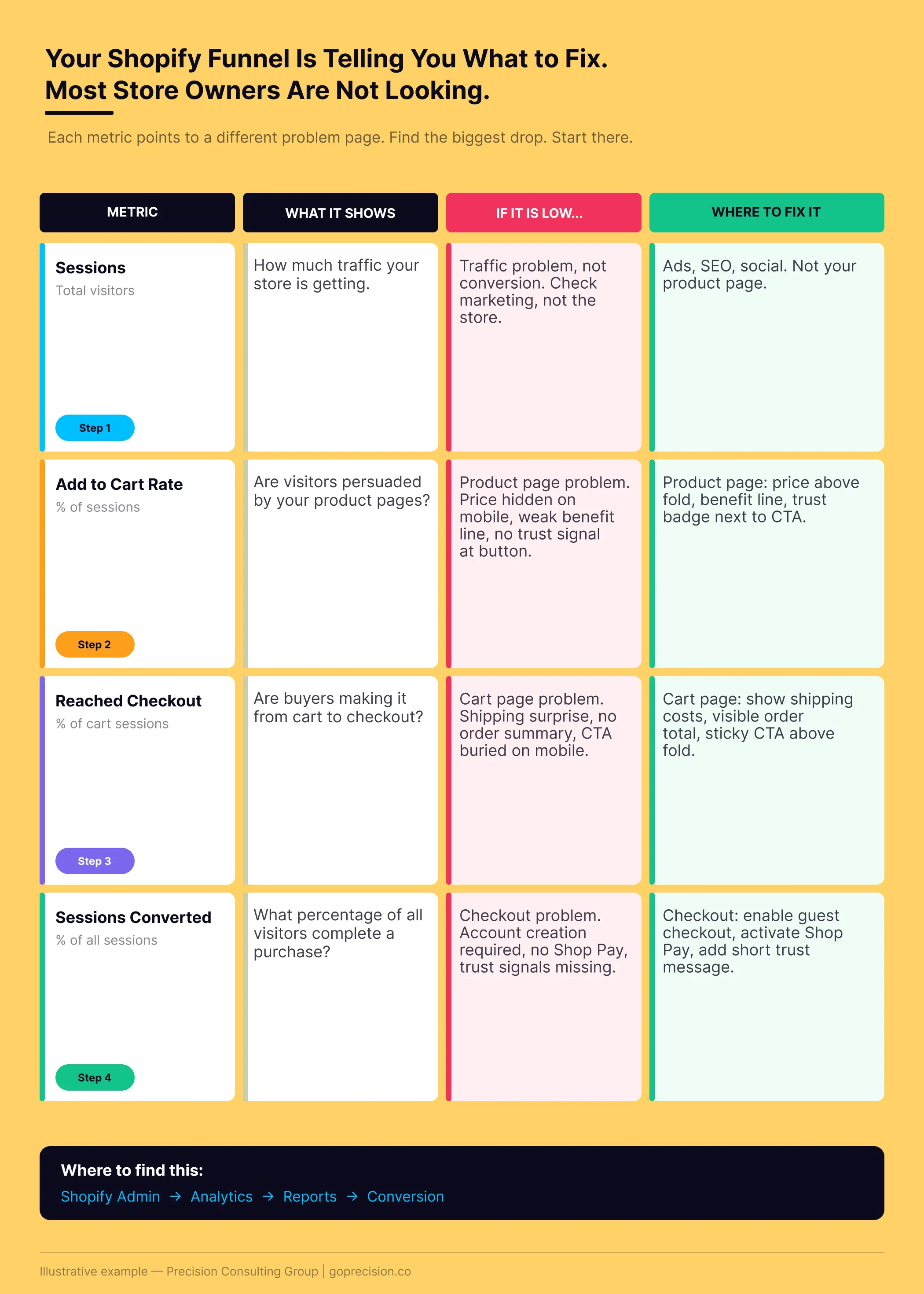
Shopify conversion funnel: where stores lose buyers between product pages, cart, and checkout, and which step to address first.
Shopify app bloat is your biggest pre-launch conversion killer
Run your Shopify store through Google PageSpeed Insights before you launch. Not after. Most new stores fail on the first try because they install between five and ten apps during setup, each of which adds its own scripts to every page load. According to Google, a one-second delay in mobile load time reduces conversions by up to 20%.
On Shopify, the most common cause of slowness is app bloat. Review app, upsell app, loyalty app, pop-up app, bundle app. Each one slows your store, and most of them are not generating enough revenue to justify the speed cost before you have any data to measure against.
Open your Shopify admin and go to Apps. For each one, ask: is this app directly involved in a customer's purchase? If not, remove it before launch. Shopify now has native upsell, review, and discount features that add no third-party script weight. Use those first, and add apps back only once you have conversion data to measure their impact against.
Your Shopify product page is hiding the price on mobile
Open your best product page on your phone. Not a desktop preview. An actual phone. Count how many times you have to scroll before you can see the price and the Add to Cart button at the same time. On most default Shopify themes, that answer is once. On some, it is twice.
The price and the Add to Cart button need to be visible above the fold on a 390px screen. If they are not, you are asking your buyer to scroll before they can buy. Many of them will not.
Two other things to fix on the product page template before launch. Add a single benefit line directly under the product title. Not a feature list. One sentence that answers: what does this do for me? And put a returns policy and a security badge directly next to the Add to Cart button. The moment of doubt is when the button is visible. That is when the reassurance needs to appear.
Commitment and Consistency: Once a buyer has decided they want a product, the product page's job is to remove doubt, not add more reasons to buy. A visible price, a clear benefit, and a returns policy adjacent to the button reduce the friction between intent and action.
Your checkout is set to Shopify's defaults, not your customers' preferences
On standard Shopify plans, checkout customisation is limited. You can add a logo, change the button colour, and add a short custom message. On Shopify Plus, you get checkout extensibility, which is significantly more flexible. Whatever plan you are on, there are three things to do before launch.
Set customer accounts to optional, not required. Buyers who must create an account before completing a purchase will leave. Enable Shop Pay. According to Shopify, it achieves checkout completion rates up to 50% higher than guest checkout. And make sure your shipping rates are visible on the cart page before anyone reaches the payment screen. The most common cause of checkout abandonment is a cost that appears only at the final step.
In Shopify admin, go to Settings, then Checkout. Set customer accounts to optional. Under payment methods, enable Shop Pay, Apple Pay, and Google Pay. In your theme settings, enable estimated shipping display on the cart page. Add a trust message in the checkout custom message field. Keep it short, specific, and true. '30-day returns. Ships within 24 hours.'
After launch: which Shopify analytics tell you where conversions are failing
The Shopify analytics that tell you where conversions are failing are the funnel-stage metrics: add-to-cart rate, cart-to-checkout conversion, and checkout completion rate. Revenue and orders are the result. These are the diagnostic. Most Shopify store owners check the result and miss the diagnostic.
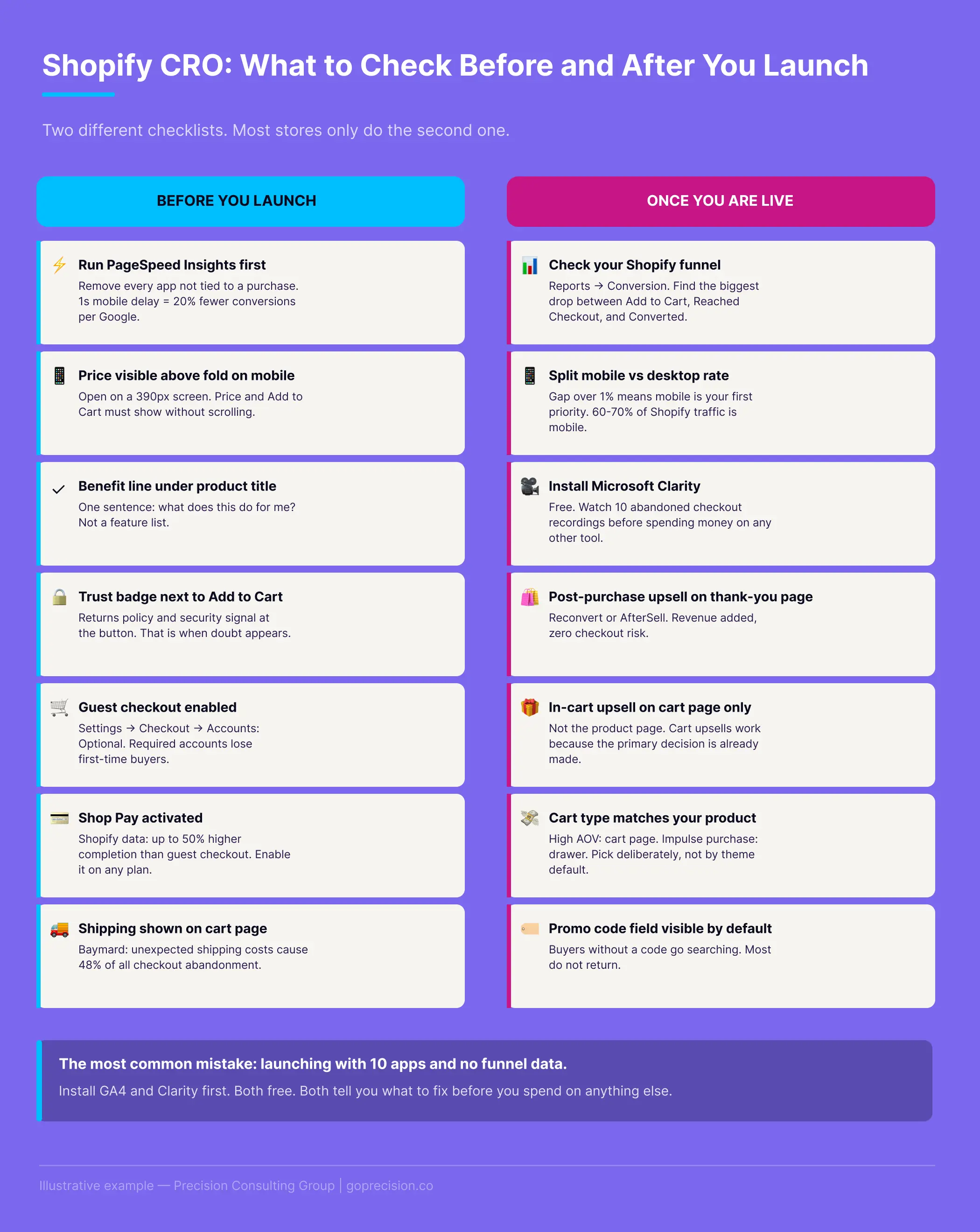
Pre-launch settings and post-launch monitoring: the Shopify-specific priorities most stores skip.
Your Shopify conversion funnel shows exactly where buyers drop off
In your Shopify analytics, go to Reports and then Conversion. You will see four numbers: sessions, added to cart, reached checkout, and sessions converted. The biggest percentage drop between any two of those steps is your conversion problem. Everything else is secondary.
- If your Add to Cart rate is low, the problem is on your product pages. Buyers are seeing the product and not being persuaded to add it.
- If your Add to Cart rate is reasonable but your Reached Checkout rate is low, the problem is likely with your cart page.
- If both are reasonable but your conversion rate is low, the problem is your checkout.
Check this funnel every week, not every day. Daily numbers are noise. Weekly trends are where the signal is.
Mobile is where most Shopify stores lose the most conversions
In Shopify analytics, go to Sessions by device type. Most Shopify stores see 60 to 70% of their traffic on mobile. Check whether your mobile conversion rate is significantly lower than your desktop conversion rate. If the gap exceeds one percentage point, mobile is your priority.
Install Microsoft Clarity from the Shopify App Store. It is free, adds minimal script weight, and gives you session recordings and heatmaps. Watch ten recordings of mobile sessions where someone added to cart but did not purchase. You will see exactly where people are struggling: the wrong keyboard type on the card field, shipping costs appearing for the first time at checkout, a CTA button that requires scrolling to reach. Once you know where the friction is, you can run structured tests. The A/B testing guide for founders covers how to do this without needing a large traffic base.
Install Microsoft Clarity, set it to record mobile sessions, and let it run for two weeks before you do anything else. Then watch the recordings. The answer to what is breaking your mobile conversion is almost always visible in the first ten recordings of abandoned checkout sessions.
Which Shopify upsell apps are worth installing
Most upsell apps on the Shopify App Store do similar things. The question is not which has the best features. It is whether the revenue they add justifies the page speed cost and the checkout risk. If you are trying to increase your store's average order value, where you place the upsell matters as much as what you offer.
Post-purchase upsells add revenue without touching the checkout
Post-purchase upsells trigger on the thank-you page, after the order has already been confirmed. The buyer has paid. There is no checkout at risk. This makes them the safest place to test upsell offers.
Reconvert and AfterSell both work well for this. They present a single-click offer on the order confirmation page where the buyer is in a positive state and the cognitive cost of a second decision is low. Conversion rates for post-purchase upsells typically range from 5% to 15% of orders, depending on offer relevance and price point.
In-cart upsells belong on the cart page, not the product page
If you want to show upsells before checkout, put them on the cart page, not the product page. A product page upsell appears before the primary buying decision is made, creating choice paralysis. A cart page upsell appears after the buyer has already committed to the item in their basket and is in a different psychological state.
Candy Rack and Frequently Bought Together are both worth testing for in-cart upsells. Keep the offer relevant to the cart contents, set the price point lower than the primary item, and limit the display to one offer at a time.
For bundles and volume discounts, check Shopify's native discount functionality before adding an app. Automatic discounts, tiered pricing, and buy-more-save-more structures are all now available natively, without any third-party script weight.
This is the kind of analysis we run in a Precision Deep Dive Audit. If you want to see exactly where your store is leaking revenue, request your free audit and we will walk through it together.
Which default Shopify settings are hurting your conversion rate
Several default Shopify settings quietly hurt your conversion rate. They are not bad design, just defaults that prioritise broad applicability over your specific store. These are in your admin right now, shipped at settings that are not optimised for conversion.
Your Shopify cart type is set to whatever the theme defaulted to
Shopify gives you three cart types: page, drawer, and notification. Most themes default to the drawer. For stores with a high average order value or complex products where buyers want to review their cart before proceeding, a full cart page gives you more space for order summaries, trust signals, and upsell placements. For impulse-purchase stores with simple products, the drawer shortens the checkout path. Look at your products and your price point and choose deliberately, not by default.
Your Shopify promo code field is sending buyers away to find a discount
Shopify shows the promo code field at checkout by default, and it is always visible. Buyers who do not have a code see it, assume there is a discount they are missing, and go to search for one. Most of them do not come back.
On standard Shopify plans, you cannot hide or collapse this field. The workaround is to be deliberate about how broadly you distribute discount codes. If most of your customers do not have a code, making it prominent creates more abandonment than it prevents.
Surprise shipping costs at checkout are a top cause of Shopify cart abandonment
The Baymard Institute's research puts unexpected shipping costs as the cause of 48% of all checkout abandonment. Nothing else comes close. This is the same pattern we see in cart abandonment more broadly. A cost that appears for the first time at the payment screen does not feel like information. It feels like a broken promise.
Show your shipping rates on the product page and cart page. Not just at checkout. Shopify allows you to display estimated shipping in the cart. Enable it. If your theme does not support it natively, a shipping bar app can show your free shipping threshold with the gap amount visible as the buyer builds their cart.
In your Shopify theme settings, look for the cart page settings and enable calculated or estimated shipping display. If your theme does not support this, add a free shipping progress bar app. Both take less than an hour to set up and address the single highest-impact cause of checkout abandonment.
The changes that move conversion rate the most are rarely dramatic. They are the ones that remove the friction you built into your store during setup, before you had any data to tell you it was there.
Want to know exactly where your Shopify store is losing revenue right now? See how Precision works with e-commerce brands, or book a free strategy call and we will walk through your conversion funnel together.
Hooked by Nir Eyal covers the Fogg Behaviour Model and how friction determines whether motivated users complete an action. This is directly relevant to checkout settings and form friction on Shopify. Influence by Robert Cialdini covers social proof, commitment, and trust, all of which underpin the trust signals and checkout psychology in this article.
- Most Shopify conversion problems are set at launch. App bloat, hidden mobile pricing, and default checkout settings are the most common causes.
- Run your store through Google PageSpeed Insights before you go live. A one-second mobile delay reduces conversions by up to 20% according to Google.
- Price and Add to Cart must be visible above the fold on a 390px screen without scrolling. Check this on an actual phone before launch.
- Enable Shop Pay on every plan. According to Shopify, it achieves checkout completion rates up to 50% higher than guest checkout.
- Your Shopify funnel in Reports shows exactly where buyers are dropping out. Add-to-Cart rate versus Reached Checkout versus conversion tells you which part of the store to fix first.
- Post-purchase upsells on the thank-you page add revenue without any checkout risk. In-cart upsells belong on the cart page, not the product page.
- The Baymard Institute puts unexpected shipping costs as the cause of 48% of all checkout abandonment. Shopify lets you show estimated shipping on the cart page. Enable it.
- Microsoft Clarity is free and shows you exactly where mobile sessions break down. Watch ten abandoned checkout recordings before making any changes.
Frequently Asked Questions
What is Shopify conversion rate optimisation?
Shopify conversion rate optimisation is the process of making changes to your store, product pages, checkout settings, and site speed to increase the percentage of your existing visitors who complete a purchase. It is Shopify-specific because the platform has particular constraints on checkout customisation and its own analytics, which differ from those of other e-commerce platforms.
What is a good conversion rate for a Shopify store?
A conversion rate between 1% and 3% is typical for most Shopify stores. Above 3.5% is strong performance. Below 1% almost always indicates a fixable structural problem with the store, not the product or the traffic source. The most useful comparison is your own rate over time, not an industry average.
Why is my Shopify store getting traffic but not converting?
Start with your Shopify funnel data. Go to Reports, then Conversion, and find the step with the biggest drop-off. If your Add to Cart rate is below 5%, the problem is your product pages. If it is above 5% but your checkout conversion is low, the problem is your cart or checkout. Install Microsoft Clarity and watch ten recordings of abandoned sessions at that specific step before you do anything else.
Does Shopify affect SEO?
Shopify handles most technical SEO requirements out of the box. The main SEO risk is page speed. App bloat and large uncompressed images are the most common causes of slow Shopify stores, and page speed affects both Google rankings and conversion rate. Compress images before uploading and remove apps that are not actively generating revenue.
What is the difference between standard Shopify and Shopify Plus for CRO?
Standard Shopify plans allow limited checkout customisation: logo, button colour, and a short custom message. Shopify Plus gives you access to checkout extensibility, which allows structural changes to the checkout layout, custom upsell blocks within checkout, and more granular trust signal placements. For most stores, the highest-impact checkout changes are available on any plan: enabling Shop Pay, setting guest checkout as default, and displaying shipping costs before the payment screen.
