Shopify vs WooCommerce for conversions comes down to three things: checkout architecture, page speed, and A/B testing access. Get those three wrong, and no amount of CRO work closes the gap. Most platform debates skip all three entirely.
The mistake I see most often is teams picking a platform based on pricing or ecosystem and then trying to CRO their way out of a poor default baseline. The platform is not neutral. It has opinions about your conversion rate before you touch a single element. In the work we do at Precision, platform audit is always the first step before any optimisation work begins.
The honest answer is that Shopify converts better out of the box. WooCommerce converts better when you need to deviate from the standard checkout path and are willing to do the configuration work to get there. Neither is categorically superior. The gap between them is real at the default level and is closable with deliberate setup. This article covers the five areas where platform choice actually affects your conversion rate.
Why platform choice is a conversion decision, not just an infrastructure one
Most platform conversations treat the technology as a container and the conversion work as something you pour in afterwards. That framing is wrong. The platform determines your checkout architecture before you touch a single element. It determines how fast your pages load before you run a single test. It determines whether your team can test the checkout at all.
Think of it like the difference between renting a serviced apartment and buying a flat to renovate. The serviced apartment (Shopify) is ready to live in immediately. The maintenance is someone else's problem. You cannot knock down walls. The flat you own (WooCommerce) gives you full control of every structural decision. Every leak is your leak, and every renovation requires a contractor. Neither is wrong. The question is which one suits your team's capability and your product's checkout requirements, and specifically which one closes the gap between your current conversion rate and what the data says is achievable.
Status quo bias: Teams underestimate how much their platform choice anchors their conversion ceiling. Once infrastructure is in place, the psychological cost of switching feels enormous, so teams try to optimise around platform constraints rather than addressing the constraint itself. Recognising this bias early means evaluating the platform before sinking conversion work into it, not after twelve months of hitting the same ceiling.
Before running any CRO work on a new or existing store: benchmark your current checkout conversion rate and Core Web Vitals scores. These two numbers tell you how much of your conversion gap is platform-driven and how much is fixable without changing anything structural. If your Core Web Vitals are poor and you are on shared WooCommerce hosting, the platform configuration is the first fix, not the last.
Which platform has the better checkout?
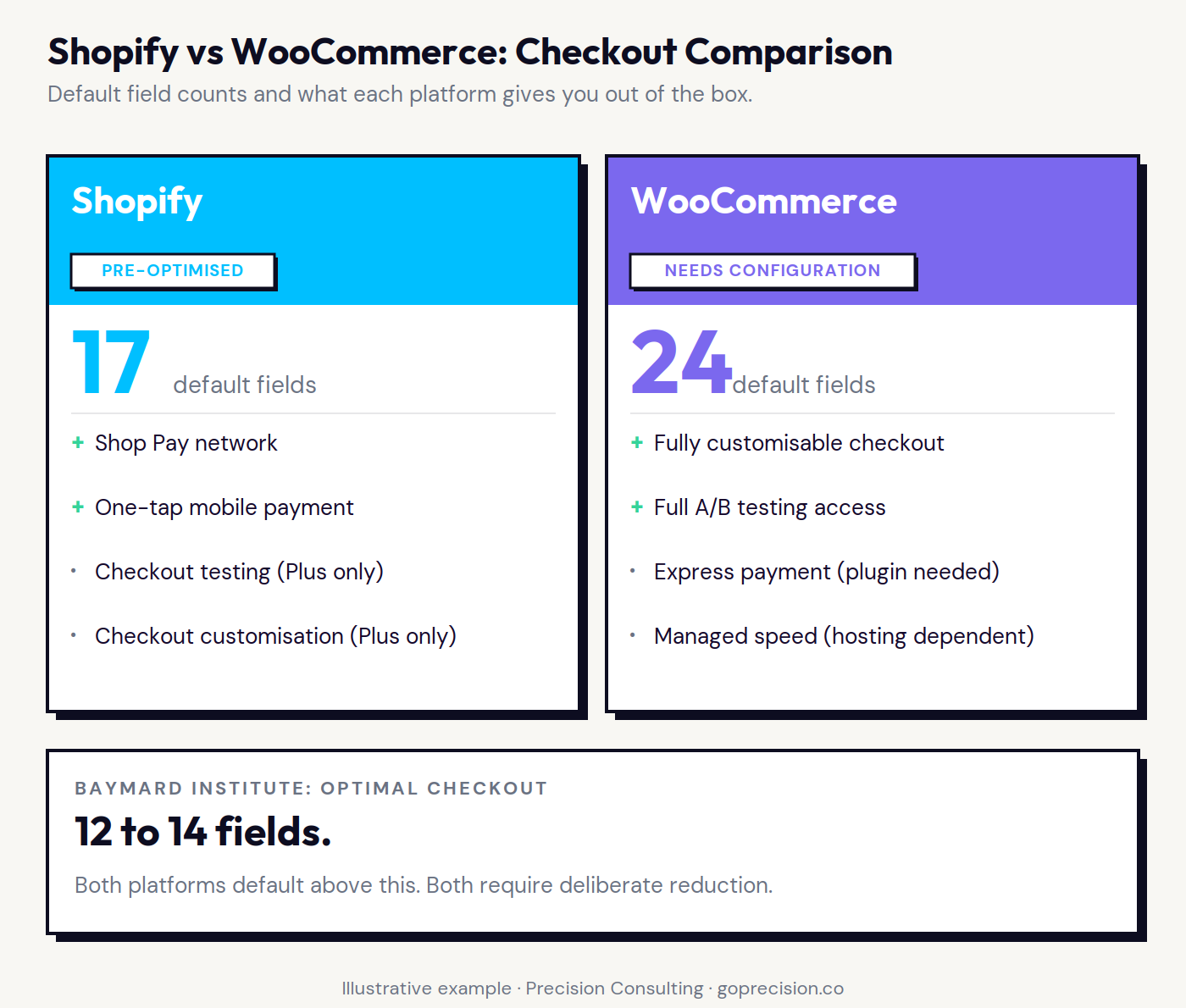
This is the biggest conversion difference between the two, and at the default level, it is not close. Shopify's checkout is pre-optimised. WooCommerce's is a starting point. Most WooCommerce stores I audit have never changed the default checkout field count.
What Shopify's checkout does right
Shopify's native checkout is a one-page or accelerated format. Shop Pay pre-fills payment and address details for returning buyers across Shopify's entire network, not just your store. Shopify reports that Shop Pay improves checkout completion rates by up to 50% compared to guest checkout. That number is the result of years of optimisation across hundreds of millions of transactions. You inherit it on day one.
The consistency matters as much as the performance. Every Shopify checkout follows the same structure: address, delivery, and payment. That predictability makes testing meaningful, because changes are isolated. When you test button colour, you are testing button colour, not untangling it from three other variables that changed at the same time. The constraint is immutability. Standard Shopify plans give you almost no ability to restructure the checkout flow. If your product requires a non-standard checkout (configured bundles, complex subscription billing, B2B order approvals), you will hit the ceiling quickly. For stores with standard checkout requirements, it is irrelevant. More on how to push Shopify's checkout performance further in the Shopify CRO guide.
What WooCommerce's checkout requires
WooCommerce's checkout is fully customisable. Field order, step structure, payment methods, and custom logic are all editable. For stores with complex requirements, this is not optional flexibility. It is a hard requirement. The conversion cost is the configuration burden. Baymard Institute research puts the optimal checkout at 12 to 14 form fields. The average checkout across the web has 23. WooCommerce's default sits toward the higher end of that range unless you deliberately reduce it. The full field-by-field diagnostic is in the checkout optimisation guide.
In a Precision checkout audit on a WooCommerce store running 40,000 monthly visitors, the first thing we did was count the fields. Default checkout: 24 fields. We brought it to 11 and enabled Stripe Express. Checkout conversion improved 22% in the first four weeks. The platform did not change. The configuration did. A properly configured WooCommerce checkout can match Shopify's default performance. The difference is that Shopify gives you that performance without asking. WooCommerce makes you earn it.
Cognitive Load Theory: Every form field, every decision point, every step the buyer did not expect consumes working memory. A checkout with twelve questions converts better than one with twenty-four, not because the extra questions are unreasonable, but because each one is an opportunity to stop and reconsider a decision that was already made. By the time someone reaches your checkout, they have decided to buy. The checkout's job is not to undo that decision.
Audit your checkout fields. Remove every field that is not required to complete the transaction. Phone number is optional for most product categories. Title is almost never necessary. First name and last name can sometimes be combined. For WooCommerce: install a one-page checkout plugin and enable express payment options before running any other CRO work on the checkout. That single configuration step is higher leverage than any A/B test you could run on the same page.
Shopify's checkout defaults to fewer fields and one-tap payment options. WooCommerce's default requires deliberate configuration to reach equivalent performance.
Which platform is faster, and why that matters for conversion
Speed is not a technical metric. It is a conversion metric. Deloitte's Milliseconds Make Millions research found that a 0.1-second improvement in mobile load time increases retail conversion rates by 8.4%.Google's data shows that a 3-second load time increases bounce rate by 32% compared to a 1-second load. Slower pages produce fewer sales. The maths is direct.
Shopify's speed infrastructure
Shopify hosts on a global CDN. Your storefront is served from infrastructure that Shopify maintains, optimises, and scales. You do not think about servers. You do not configure caching. Core Web Vitals scores for Shopify stores are consistently strong across regions without any deliberate action from the store owner.
The risk is the app layer. Every Shopify app that injects JavaScript into your storefront adds weight. A store with fifteen apps will be measurably slower than one with four, regardless of Shopify's underlying infrastructure quality. Treat every app install as a page speed decision, not just a features decision. Audit app page weight quarterly and remove anything that is not producing a measurable return.
WooCommerce's speed reality
WooCommerce performance is entirely your responsibility. On shared hosting, WooCommerce stores routinely score poorly on Core Web Vitals. On managed WooCommerce hosting (Kinsta, WP Engine, or Pressable), performance can match or exceed Shopify. The hosting choice is the biggest speed variable, and it is one that most new WooCommerce store owners get wrong.
Beyond hosting: a proper caching layer (WP Rocket is the standard), a CDN (Cloudflare), and image compression at upload. None of this is technically difficult. All of it is ongoing maintenance that Shopify handles for you. That maintenance has a real cost in time and attention, especially at scale. If you are on shared hosting and wondering why your conversion rate is low, check your Core Web Vitals before you touch anything else.
Processing fluency: Fast pages feel more trustworthy. When a page loads instantly, buyers attribute that smoothness to the brand as a whole, not to the server. Slow pages create the opposite effect: a subtle but measurable signal that something is not quite right, which primes hesitation exactly at the point of purchase. Speed is a trust signal as much as a usability metric, and both platforms carry that cost differently.
For WooCommerce stores: check your hosting before anything else. Run your store through PageSpeed Insights and look at Time to First Byte. If it is above 600ms, your hosting is the bottleneck. Upgrade to managed hosting before spending time on any other speed work. For Shopify stores: audit your installed apps and measure the JavaScript weight each one adds. Remove anything you are not actively tracking against a measurable outcome.
Which platform has better mobile conversion?
Mobile accounts for the majority of e-commerce traffic for most consumer brands, and the conversion gap between mobile and desktop on the same store typically sits at 2 to 3 percentage points. Platform choice plays a role in how wide that gap is. For a detailed breakdown of mobile-specific fixes, the mobile CRO guide covers the full diagnostic.
Shopify themes are mobile-responsive by default. The checkout is built for mobile from the ground up. Shop Pay, Apple Pay, and Google Pay are one-tap on mobile. They remove the largest single friction point in the mobile purchase flow: entering card details on a small screen.
WooCommerce themes vary. Some are excellent on mobile. Many are not. The checkout default is not optimised for tap targets, field spacing, or triggering the right keyboard type for each input. Postcode field on an iPhone should trigger the number pad. On a default WooCommerce checkout without configuration, it often does not. These are small things. They cost real conversion. The honest answer on mobile is the same as on checkout: Shopify's default is stronger, WooCommerce's ceiling is higher, and most stores are running the default.
Effort heuristic: Buyers on mobile are in a lower-commitment mode than desktop buyers. Any friction that requires extra effort (typing card numbers, zooming into small text, hitting the wrong tap target) is disproportionately likely to cause abandonment. The mobile checkout is where the effort heuristic does the most damage, because the environment already makes everything slightly harder than it should be. Removing that extra effort is not a nice-to-have. It is the conversion lever.
Test your own checkout on a real device, not a browser preview. Go through the complete purchase flow on both an iPhone and an Android device. Check that the number pad triggers for numeric fields, that tap targets are large enough to hit without zooming, and that express payment options are visible without scrolling. Fix the inputs before running any mobile CRO tests on the same page.
Which platform makes A/B testing easier?
Your CRO programme is only as fast as your ability to get from hypothesis to result. Platform architecture affects that speed more than most teams realise. The A/B testing guide for founders covers how to structure a testing calendar that works within your platform's constraints and how to prioritise the tests that compound fastest.
Testing on Shopify
Shopify 2.0's theme architecture is structured enough that VWO, Convert.com, and AB Tasty work reliably on product pages, collection pages, and landing pages. The testing surface is meaningful. The checkout is a different problem. Standard Shopify plans block checkout modification entirely. You cannot A/B test checkout layout, CTA copy, field order, or step structure. That restriction is significant because the checkout is where the most valuable conversion tests live. To unlock checkout testing, you need Shopify Plus and the Checkout Extensibility API. That is a meaningful price step for most growth-stage stores. If checkout testing is your priority and Plus is not in your budget, Shopify is the wrong platform for your CRO programme right now.
Testing on WooCommerce
WooCommerce has no testing restrictions. Every element of every page, including the checkout, is available to test. VWO, Convert.com, and AB Tasty all work across the full funnel. There is no platform ceiling on what you can test. The practical challenge is stability. WooCommerce sites with many plugins can behave unpredictably when an A/B testing tool injects JavaScript alongside a custom payment plugin or a checkout modification plugin. Tests that change checkout behaviour need careful QA before running on live traffic. This is not a reason to avoid WooCommerce for CRO. It is a reason to be methodical about how you deploy tests.
Compounding in testing: CRO gains compound. A 5% improvement in checkout conversion, followed by a 4% improvement in product page add-to-cart rate, is not a 9% total gain. It is a 9.2% gain that builds on the new higher baseline. Every test you cannot run on your current platform is a missed compound cycle. Platform testing restrictions are not just a technical inconvenience. They are a cap on your annual compounding rate.
Map your testing priorities against your platform before committing to a CRO roadmap. If the highest-value tests on your list involve the checkout and you are on standard Shopify, decide whether Shopify Plus is in the budget or whether WooCommerce's flexibility is worth the migration cost. Do not build a 12-month testing roadmap on a platform that blocks your highest-priority tests in month two.
Which platform has a lower cost of change?
The speed at which you can implement, test, and iterate directly affects how many improvements you make in a year. A team that runs twelve tests per year compounds faster than one that runs three. Platform choice affects that cadence in ways that do not show up in the initial platform comparison.
Shopify's change costs
Copy changes, image swaps, and section reordering: Shopify's theme editor handles all of these without a developer. For structural changes (new page templates, checkout modifications, custom functionality), a Shopify developer is required. The app ecosystem shortens implementation time for common improvements: review apps, urgency tools, cross-sell widgets, and cart abandonment recovery. Each app is a recurring monthly cost and a potential speed liability. The trade-off is speed of implementation against long-term platform weight. Every app you add is a decision you are making about your site speed, not just your feature set.
WooCommerce's change costs
WooCommerce's plugin ecosystem is larger and cheaper than Shopify's app store. For a developer familiar with WordPress, structural changes are faster to implement. The hidden cost is maintenance: every WordPress core update, WooCommerce update, and plugin update needs to be tested. A plugin update that breaks the checkout in a way that goes undetected overnight costs more than any implementation saving. For teams with in-house WordPress development, WooCommerce's cost of change is lower. For teams without it, Shopify's managed environment is significantly lower risk. This is the question that actually determines platform fit, more than any feature comparison.
Attention residue: Every time a developer has to context-switch between maintaining plugin compatibility and building conversion improvements, implementation velocity drops. Hidden maintenance costs do not just consume budget. They consume the attention that should be going into iteration. Teams underestimate this cost because maintenance happens in small increments, while the opportunity cost accumulates invisibly across a year of deferred tests.
Build a maintenance budget into your WooCommerce total cost of ownership before comparing it to Shopify. Include developer time for updates, plugin compatibility testing, and staging environment maintenance. If the total comes out higher than Shopify's monthly fee plus a developer retainer, Shopify may be the more cost-effective platform for your current team structure, even before you factor in the conversion baseline difference.
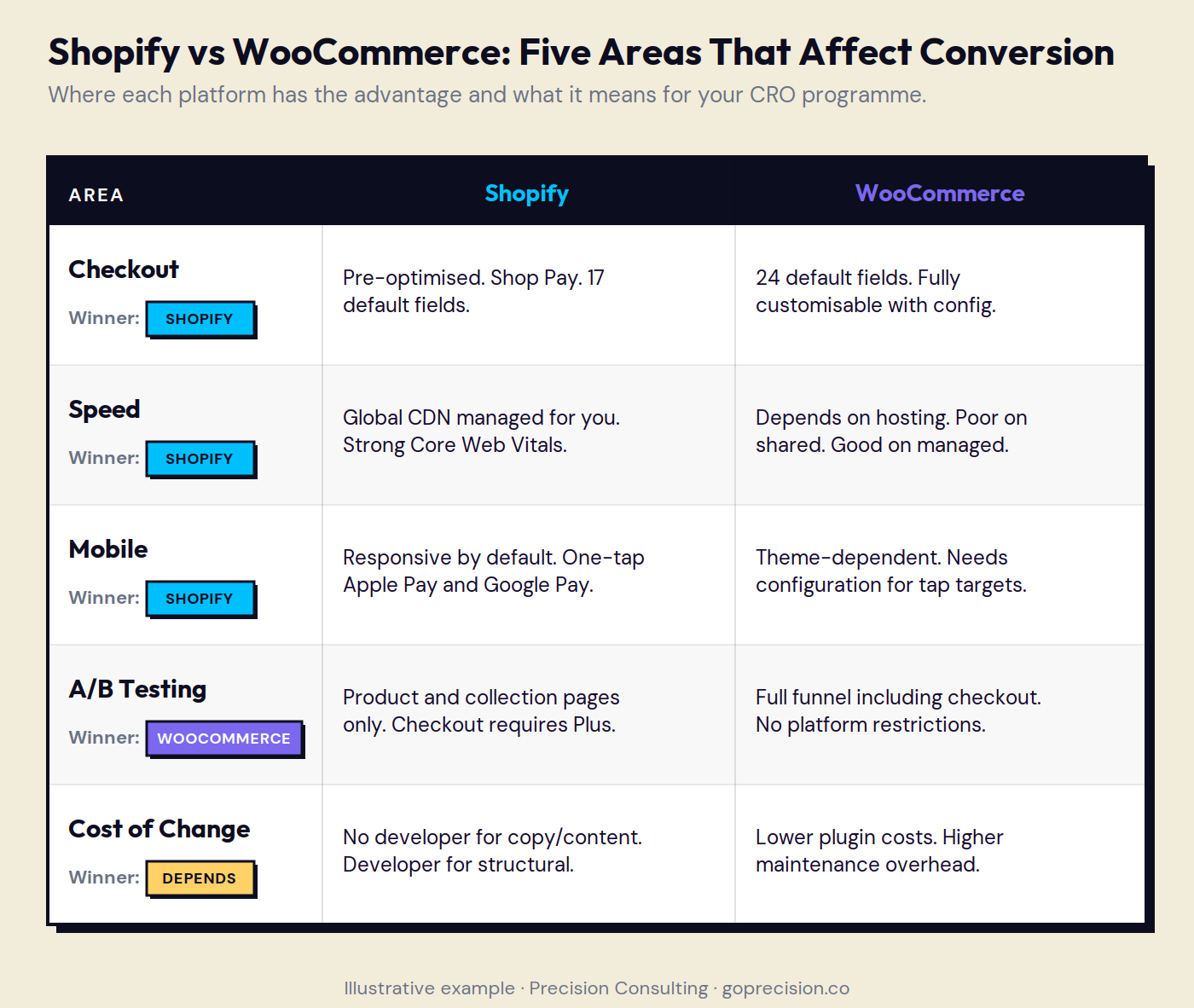
Platform comparison across the five conversion variables. Neither platform wins outright. The right choice depends on team capability and checkout requirements.
So which platform should you choose?
Not sure where your platform setup is costing you conversions? Request your free audit and we will walk through the five areas above together, identify the highest-return fixes for your specific configuration, and give you a clear priority order.
If your checkout is standard, you do not have in-house WordPress development, and you want strong conversion performance from day one: choose Shopify. The default baseline is strong, the maintenance is managed for you, and the app ecosystem covers most common CRO improvements without custom development.
If your checkout has requirements Shopify cannot support on standard plans, you have WordPress development capability available, and you are willing to do the configuration work: choose WooCommerce. The ceiling is higher, the testing flexibility is complete, and a properly configured store closes the default performance gap.
If checkout A/B testing is your primary CRO priority and Shopify Plus is not in your budget: WooCommerce is the right platform for your CRO programme right now. Standard Shopify plans block the tests that typically produce the highest conversion lift.
If you are on shared WooCommerce hosting and your conversion rate is lower than expected: upgrade your hosting before running any other CRO work. Platform performance, not optimisation tactics, is the primary bottleneck.
One thing neither platform determines: your offer, your trust signals, and your product page quality. Those are the highest-leverage conversion variables, and they are entirely platform-agnostic. If your product page does not communicate value clearly, or your reviews are not visible at the decision moment, changing platforms will not fix your conversion rate. That is a positioning problem. Fix that first. Platform optimisation is a second-order problem.
Precision works with e-commerce brands to diagnose exactly where in the funnel conversion is being lost and what to fix first, whether that is platform configuration, checkout architecture, or product page clarity. If you want a clear view of what your platform is costing you, book a call and we will walk through it together. Or start with the full audit process to understand what a structured review looks like before committing.
Further Reading
Don't Make Me Think by Steve Krug is the clearest available book on usability and checkout design. Krug's core argument, that every unnecessary question is a risk of abandonment, underpins the checkout field reduction case made throughout this article. Read it before redesigning any part of your purchase flow.
The Baymard Institute's checkout usability research (baymard.com/checkout-usability) is the primary data source for optimal field count and form design benchmarks used here. Their large-scale studies cover both desktop and mobile checkout across hundreds of e-commerce sites and are more rigorous than any individual A/B test. Freely available in summary form.
Key Takeaways
Shopify vs WooCommerce for conversions comes down to checkout architecture, page speed, and A/B testing access. The platform has opinions about your conversion rate before you touch a single element.
The most common mistake is picking a platform on pricing or ecosystem and trying to CRO your way out of a poor default baseline. Evaluate the platform's conversion baseline before committing CRO resource to it.
Shopify's checkout outperforms WooCommerce's default through Shop Pay, one-tap mobile payment options, and a pre-optimised structure that inherits years of conversion testing at scale.
A properly configured WooCommerce checkout can match Shopify's default performance: one-page checkout plugin, express payment options, field reduction to 11 to 14 fields, and guest checkout without forced account creation.
Shopify manages speed infrastructure automatically. WooCommerce speed depends entirely on hosting choice. On shared hosting, WooCommerce typically underperforms Shopify significantly. Upgrade to managed hosting before any other speed work.
Standard Shopify plans block checkout A/B testing entirely. WooCommerce allows full-funnel testing without platform restrictions. If checkout testing is the CRO priority and Shopify Plus is not in budget, that is the wrong platform for the programme.
Offer clarity, trust signals, and product page quality are higher-leverage conversion variables than platform choice. Fix positioning problems before optimising platform configuration.
Every Shopify app that injects JavaScript degrades page speed. Treat every app install as a conversion decision, not just a features decision, and audit app weight quarterly.
Frequently asked questions
Does Shopify or WooCommerce have a higher conversion rate?
Shopify converts better at the default configuration, primarily because of its pre-optimised checkout and Shop Pay integration. WooCommerce's default underperforms but can be configured to match Shopify's performance. At the level of a well-configured store on either platform, conversion differences are driven by product clarity, trust signals, and checkout field count more than by platform architecture.
Can you A/B test the checkout on Shopify?
A/B testing the Shopify checkout requires Shopify Plus and access to the Checkout Extensibility API. Standard plans restrict checkout modification entirely. WooCommerce has no equivalent restriction and allows checkout testing on all configurations with compatible testing tools.
Is WooCommerce slower than Shopify?
On shared hosting, yes, often significantly. On managed WooCommerce hosting (Kinsta, WP Engine, Pressable) with proper caching and a CDN configured, WooCommerce performance can match Shopify. The difference is that Shopify manages speed infrastructure automatically. WooCommerce requires deliberate setup and ongoing maintenance to reach equivalent performance.
What is the main conversion difference between Shopify and WooCommerce?
The primary difference is checkout architecture. Shopify's checkout is pre-optimised and integrates Shop Pay for accelerated one-tap purchase. WooCommerce's checkout requires configuration to reach equivalent performance and defaults above the optimal field count that Baymard Institute identifies. For stores where checkout is the primary conversion bottleneck, this difference is material.
Which platform is better for CRO?
WooCommerce offers more testing flexibility because it allows full-funnel testing, including the checkout. Shopify has a better default conversion baseline but limits checkout testing to Plus plans. For teams running a serious CRO programme with checkout testing as a priority, WooCommerce's access is an advantage. For teams focused on product page and collection page optimisation, Shopify's consistent baseline is often easier to work with.
How many form fields should a checkout have?
Baymard Institute research puts the optimal checkout at 12 to 14 form fields. The average checkout across the web has 23. Both Shopify and WooCommerce default above the optimal number. WooCommerce requires manual configuration to reduce the field count. Shopify's default is already closer to optimal, though it still benefits from review. Reducing checkout fields is the single highest-leverage configuration change on either platform.
Ammarah helps growth-stage e-commerce and SaaS brands increase revenue through psychology-driven CRO and UX strategy. With over a decade of experience across major tech platforms in Asia and the Middle East, she combines behavioural psychology with conversion data to identify and fix the specific points where browsers become buyers.
Weekly CRO Notes
The Mailer
Never miss an insight
Weekly CRO breakdowns and the tactics seven-figure e-commerce brands are using right now.