Last updated:
E-commerce site search optimisation is the process of improving how your store's internal search function finds, ranks, and presents products to buyers, to increase conversion rate and revenue from the visitors who already know what they want. It is the work most stores have not done. At Precision, it is also the work that consistently produces some of the fastest measurable gains.
Most stores know their search bar converts better than browsing. What they have not done is look at the data. The search term report has not been opened in months. The zero-results page sends buyers to a dead end with no recovery path. Autocomplete is broken or absent. A high-intent channel is being treated as a feature nobody maintains.
Buyers who use search have already made the first decision. They are not browsing. They have a specific product or category in mind, and they want it fast. Every friction point between that intent and the product page is a conversion lost that you could have prevented. This article covers the full diagnostic: what to measure, where the losses are, and which fixes produce the most revenue with the least effort.
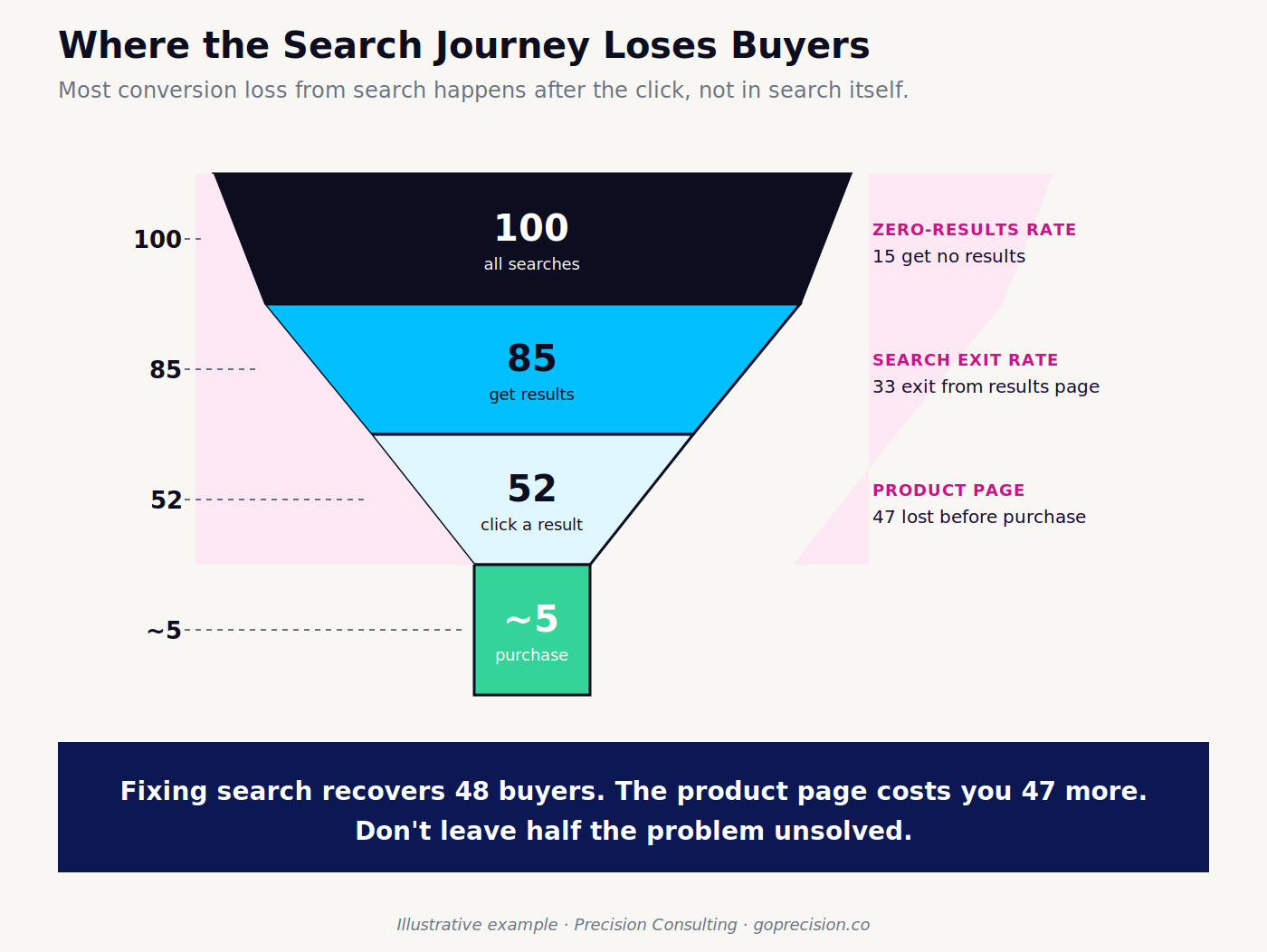
The four stages where search loses buyers: query entry, zero-results, ranking quality, and product page conversion.
Why are site search buyers your highest-intent visitors?
A buyer who uses your search bar has already committed to looking for something specific. They are not discovering your brand. They are past the awareness stage. They want a product, and they want to know whether you have it. The conversion rate gap between search users and browsers reflects that intent difference, not a quality difference in the buyers themselves.
The revenue opportunity most stores ignore
If 15% of your traffic uses site search and those buyers convert at twice the rate of the other 85%, then search is producing a disproportionate share of your revenue from a minority of your visitors. The maths favour investing in search quality over almost any other CRO lever at that ratio. What I find when I run the numbers on real stores is that most founders have never calculated what their search conversion rate is, let alone what improving it by 20% would produce.
Pull your search analytics. Look at the sessions that include a search event versus those that do not. Calculate the conversion rate for each group. If the search group converts at more than 1.5 times the non-search group, your search function is a revenue channel that deserves the same attention as your checkout.
What search intent actually looks like
Search queries on e-commerce stores fall into three categories. Navigational queries are buyers looking for something they already know you have, such as a specific product name or SKU. Informational queries are buyers trying to find a category or type of product, such as "blue trainers under $60". Transactional queries are buyers ready to buy, often with specific attributes. The closer a query is to transactional, the more critical it is that the search result is accurate and the product page is optimised. For what happens after the buyer clicks through, our article on product page design covers what the landing page needs to do to convert that intent.
The psychology of search intent: Buyers who type a query into your search bar have self-selected as high-intent. The act of searching signals commitment. They have moved past browsing and into evaluation mode. That is the decision frame you are optimising within: not "should I buy something?" but "does this store have what I want?" The job of your search function is to answer yes as clearly and quickly as possible.
Why is your zero-results page your most expensive page?
A zero-results page is a buyer who told you exactly what they want and received the answer "we cannot help you." Most stores follow that with a generic "No results found" message and a search bar. Some add a suggestion to browse all products. Almost none treat this as the conversion emergency it is.
What zero results actually tell you
A zero-results query is data. It tells you either that you do not stock something buyers want, that your product data is missing terms buyers use to describe what you do stock, or that your search engine cannot handle the query format. All three are fixable. The first tells you about your range. The second tells you about your product attributes and copy. The third tells you about your search configuration.
What appears most often is the second category. A buyer searches for "slate grey joggers" and gets zero results, but you have them listed as "charcoal slim-fit tracksuit bottoms". The product exists. The vocabulary gap between how buyers search and how you name products is producing zero results.
What to do about your zero-results queries
Pull your site search data and filter for zero-results queries. Export the last 90 days. Sort by frequency. The top 20 queries returning zero results are your highest-priority fixes. For each query, either:
- Add a synonym so that the search engine maps the buyer's term to the right products.
- Add the term to the relevant product descriptions and attributes.
- Create a redirect from the search term to the closest category page.
Fix these 20 before touching anything else in your search configuration. A zero-results rate above 10% indicates a significant vocabulary gap and is the highest-priority problem in your search function.
Quick fix: Export your zero-results report, sort by volume, and add synonyms for the top 20 queries. In most search tools this takes less than a day and produces immediate measurable results. It is the single highest-return search task you can complete without a developer.
How does search ranking determine what buyers see and do next?
Search ranking on an e-commerce store is a conversion decision, not a technical default. What appears first in the results determines which products get considered and which get ignored. Most stores ship with their platform's default ranking, which is typically a combination of recency, exact match, and sometimes popularity. That default is rarely aligned with conversion.
What should rank first?
The products that should rank first for a given query are the ones most likely to result in a purchase. That means in-stock products with good imagery and a competitive price should rank above out-of-stock products, products with high return rates, or products with significantly fewer reviews. Ranking by recency or exact match alone does not weight any of these factors.
In practice, the easiest improvement is suppressing or downranking out-of-stock products. A buyer who clicks on a result and finds the product is unavailable exits. Surfacing availability as a ranking input reduces that exit rate. Most search tools, including Shopify's native search and third-party apps like Searchie and Boost Commerce, allow you to configure in-stock prioritisation without custom development.
Autocomplete as a conversion layer
Autocomplete suggestions appear as the buyer types. They are the fastest route from intent to result. Poor autocomplete does one of two things: it suggests queries that return low-quality results, or it does not suggest anything and forces the buyer to type their full query before seeing what is available. Both reduce conversion.
Good autocomplete shows product names, categories, and popular queries that return strong results. It surfaces availability. It avoids suggesting dead ends. The test is simple: open your store, start typing the most common search queries your buyers use, and watch what autocomplete suggests. If you would not click the suggestions yourself, your buyers will not either.
What search analytics do you need before optimising anything?
Optimising search without search data is guessing with extra steps. Every major e-commerce platform and analytics tool surfaces search data. The question is whether you are looking at it. For how to set up the behaviour tracking tools that surface this data, our article on the best CRO tools for e-commerce covers the relevant options, including Hotjar and search recording tools.
The four metrics that matter
- Search utilisation rate is the percentage of sessions that include at least one search event. If it is below 10%, buyers cannot find your search bar or have given up on it. If it is above 30%, search is carrying your navigation.
- Zero-results rate is the percentage of searches returning no results. Anything above 10% is a vocabulary or catalogue problem.
- Search exit rate is the percentage of buyers who leave your site from the search results page without clicking a result. A high exit rate from search means the results are not matching the intent.
- Search-to-purchase rate is the conversion rate for sessions that include a search event. This is the number to improve.
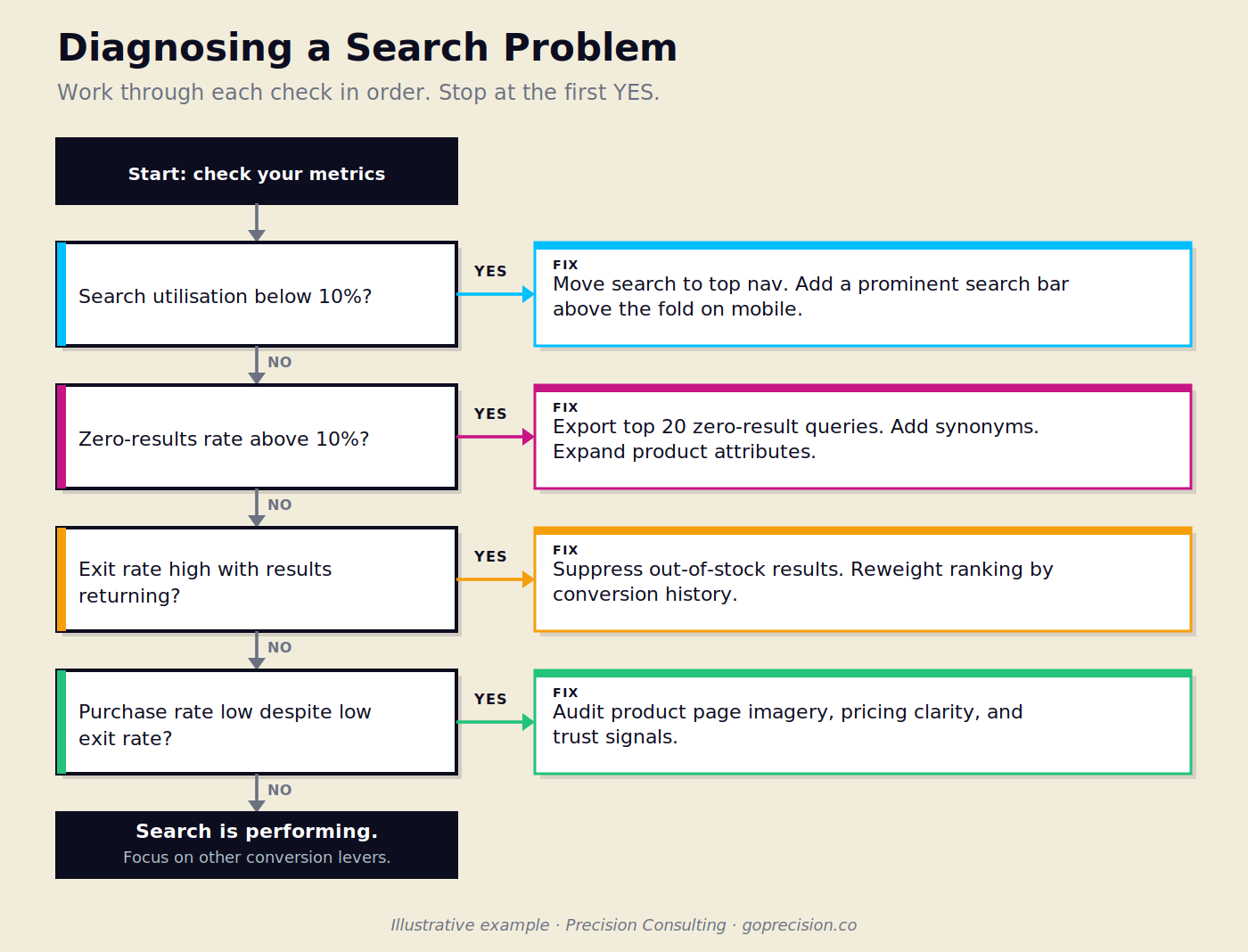
Work from top to bottom. The first metric outside its target range identifies your highest-priority search problem.
How to read your search term report
Your search term report shows every query buyers typed, how many times each was typed, and, in tools like Google Analytics 4, the conversion rate associated with each query. Sort by volume first. Look at the top 50 queries. Then sort by zero-results rate. Look for queries above 5% zero-results. Then sort by exit rate. Queries with a high exit rate and results available tell you the ranking quality is wrong, not the catalogue.
This is two hours of analysis that most stores have never done. It will give you a prioritised list of fixes more clearly than any A/B test.
Working alongside a product and engineering team at a major e-commerce marketplace, improving algorithm logic, adding synonym mapping across high-volume query categories, and restructuring result ranking produced a search-to-product-page throughput rate of 90%. The gains did not come from one change in isolation. They came from treating three connected levers together: the algorithm, the vocabulary, and the ranking order. Most stores address one at a time and find the results modest. The combination is where the step-change sits.
When treated as a commercial signal rather than a site metric, search analytics surfaces opportunities that go well beyond CRO. Queries showing unmet demand for specific categories and price points can inform ranging decisions and new product introduction, not just search configuration.
How does mobile search differ from desktop search?
Search on mobile is a different experience from search on desktop. The keyboard takes up half the screen when the buyer types. Autocomplete is more important because typing a full query on mobile is friction. Results need to load fast because mobile connections are slower. And the product card in the results needs to convey enough information for a decision without requiring the buyer to click through to confirm basic attributes. Our article on mobile CRO covers the broader pattern of how mobile search behaviour differs from desktop and what specifically to fix.
What to do for mobile search
Test your search bar on a real phone, not a browser developer tool. Type the five most common queries your buyers use. Watch how autocomplete behaves. Count how long the results take to appear. Look at whether the product cards in the results show price, availability, and a recognisable image. Then repeat the test on a slow mobile connection. Every friction point you find is a conversion point on which mobile search buyers are currently exiting.
Mobile search test: Open your store on a real device, type your top five queries, and time the autocomplete response. If suggestions take more than one second to appear, or if the first result is out of stock, you have found your mobile search priority. This test takes 15 minutes and surfaces problems that lab environments miss.
If you want to understand what your search data is telling you and which fixes will produce the most revenue, request your free audit, and we will walk through your search analytics together.
Which search improvements produce the most revenue with the least effort?
The highest-return search improvements are not technical rebuilds. They are configuration changes and content fixes that most teams can implement in days.
Synonyms and vocabulary expansion
Adding synonyms is the fastest way to convert zero-results queries into results. Most search tools have a synonym or query expansion setting. Map the vocabulary gap: identify how buyers describe products versus how you have named them. "Sofa" and "couch", "joggers" and "tracksuit bottoms", "beanie" and "knitted hat". One synonym added can eliminate zero results for a high-volume query category immediately.
This is also where product attribute data earns its value. If your product descriptions use only your internal naming conventions and not the language buyers use to search, your catalogue is invisible to anyone who does not already know your terminology. Expanding product attributes with buyer vocabulary is a content task that compounds: every term you add improves results for every future query that uses it.
Typo tolerance
Buyers misspell product names. A search for "tainers" should return trainers. Most modern search tools have typo tolerance enabled by default, but the tolerance threshold is configurable. If your zero-results rate includes obvious misspellings of product names you stock, your typo tolerance is either off or set too conservatively. This is a single configuration change, not a development project.
Redirecting specific queries to category pages
Some queries are better served by a category page than a product results list. A search for "gifts for her" is a discovery query, not a product query. Redirecting it to a curated gift guide or gift category page converts better than a raw results list because the buyer does not have a specific product in mind. Map the discovery queries in your search data and redirect them to the pages most likely to produce a purchase.
Before running any tests on search changes, make sure you have a baseline for each metric: utilisation rate, zero-results rate, exit rate, and conversion rate by query category. Running a full CRO audit before you start will also surface other friction points that might be suppressing search conversion regardless of the search function itself. For what a meaningful test structure looks like, our article on checkout optimisation uses the same framework: enough traffic, enough time, one variable at a time.
How do you measure whether your search improvements are working?
Search improvements are measurable because the data is granular. Before and after any change, track: zero-results rate for the specific queries you addressed, search exit rate for those queries, and conversion rate for sessions that included those queries. You do not need an A/B test for many of these changes because the change is a correction to a broken state, not a test of a preference. Zero-results becoming results is not a hypothesis. It is a fix.
For improvements where you are testing a preference, such as which ranking algorithm produces higher conversion, treat it the same way you would any other behavioural test. The principle is the same: enough traffic, enough time, one variable at a time. The advantage of search testing is that the segment, buyers who use search, is already isolated in your analytics. You do not need to create a segment. You are measuring an existing one.
- Buyers who use site search convert at two to three times the rate of buyers who browse. Search is your highest-intent channel, and most stores treat it as a feature nobody maintains.
- Your zero-results rate is the single most important metric to diagnose first. Anything above 10% means your search vocabulary does not match how buyers describe your products. Fix synonyms before anything else.
- Search ranking is a conversion decision. Suppressing out-of-stock products, weighting by review count and conversion history, and prioritising exact matches are configuration changes that produce measurable results without development work.
- Autocomplete is a conversion layer. If your autocomplete suggests queries that return poor results or does not surface product names buyers would recognise, it is sending buyers to dead ends before they have committed to a result.
- The highest-return search improvements are vocabulary fixes, synonyms, typo tolerance, and product attribute expansion, not technical rebuilds. Two hours of search term analysis will give you a prioritised list.
- Search analytics, when read as a commercial signal, surfaces opportunities beyond CRO. Unmet search demand reveals product range gaps and new product introduction priorities.
- Mobile search is a different experience. Test on a real device on a real mobile connection. The friction points are almost always different from desktop.
- Measure before and after any change. Track zero-results rate, search exit rate, and search-to-purchase rate by query category. These are direct measures of search quality, not proxy metrics.
Frequently asked questions
What is e-commerce site search optimisation?
E-commerce site search optimisation is the process of improving how your store's internal search function retrieves and ranks products for buyer queries. It includes reducing zero-results rates, improving ranking quality, adding synonym support, improving autocomplete, and making search results easier to navigate on mobile. The goal is to increase conversion rate for the buyers who arrive at your store with specific purchase intent.
Why do buyers who use site search convert at a higher rate?
Buyers who use site search have already moved past discovery. They know what they want and are trying to find it. That intent difference is what produces the conversion rate gap between search users and browsers. Improving the quality of what buyers find when they search captures that intent instead of losing it to a zero-results page or irrelevant results.
What is a good zero-results rate for an e-commerce site search?
A zero-results rate below 5% is a reasonable target for most e-commerce stores. Above 10% indicates a significant vocabulary gap between how buyers describe products and how those products are named in your catalogue. The fastest way to reduce zero results is by adding synonyms and expanding product attribute data to match the language your buyers use.
How do I find my site search data?
In Google Analytics 4, site search tracking needs to be enabled in the admin settings under Data Streams. Once enabled, the Search Term report shows queries, sessions, and conversion rates. Shopify stores can also access search data through the Analytics section under Behaviour. Third-party search apps typically include their own dashboards with zero-results rate, popular queries, and conversion data built in.
What is the fastest way to improve e-commerce search conversion?
The fastest improvement is fixing the highest-volume zero-results queries. Pull your search term report, filter for zero-results, sort by frequency, and add synonyms or attribute data for the top 20 queries. This can be completed in a day and produces immediate, measurable results. The second fastest improvement is suppressing out-of-stock products from appearing at the top of results.
Don't Make Me Think by Steve Krug: the chapters on navigation and search cover why buyers abandon search when results fail to match intent, and how to design search experiences that keep them moving toward purchase.
Information Architecture for the Web and Beyond by Peter Morville, Louis Rosenfeld, and Jorge Arango: the search systems chapters cover ranking, result presentation, and query expansion with the depth needed to understand the tradeoffs in your search configuration.
Ready to find out what your search data is telling you? Precision works with e-commerce brands to identify the highest-return search fixes and build a testing programme around them. Request your free audit and we will start with your search analytics.