Last updated:
The best CRO tools for Shopify are the ones that match the stage your store is at, not the most powerful ones available on the market. Stack overload is more common than tool gaps. The right setup at 5,000 monthly visitors is different from the right setup at 50,000, and different again at 500,000. Buying ahead of your stage burns budget and produces no usable data.
Building a CRO stack is closer to stocking a kitchen than building a software product. On day one of a food truck, you need a knife, a cutting board, and a propane stove. You do not need a Pacojet. By the time you are running a hundred-cover dinner service, the knife and the cutting board are still essential, but the absence of a proper combi oven is now the bottleneck. Tools earn their place by what you can actually do with them at your current scale, not by what they could do for someone three stages ahead of you.
Nir Eyal's Hooked and the Fogg Behaviour Model that runs through it are the reasons this matters. Behaviour happens when motivation, ability, and a trigger align. Every CRO tool exists to either find friction in the ability axis or to surface where the trigger broke. The right tools at the right stage move that needle. The wrong tools, regardless of price, do not.
In my work at Precision, most Shopify stores I see have either too many tools or the wrong ones for their stage. The store doing 8,000 monthly sessions has VWO, Klaviyo, three review apps, two heatmap tools, and a personalisation engine. None of which are producing usable data because the traffic is below the threshold for any of them to work. The dashboard looks impressive. The conversion rate has not moved in twelve months.
For the platform-agnostic version of this conversation, the best CRO tools for e-commerce covers the same categories without the Shopify-specific filter. This article is the version for stores that have already chosen Shopify and want the integrations that work natively with it.
What makes a CRO tool actually useful for Shopify?
A CRO tool is actually useful for Shopify when it integrates natively with Shopify checkout events, when it produces data that your traffic level can support, and when the insight it provides leads to a decision you can ship within the same week. Tools that fail any of those three tests are sitting on the dashboard, not producing returns.
Native Shopify integration is the biggest differentiator
Shopify's checkout is heavily restricted, and tools that cannot read checkout events accurately produce incomplete data. A heatmap tool that misses the checkout flow is showing you 60% of the picture. A testing tool that cannot deploy on Shopify checkout pages without Shopify Plus is useful for product pages and nothing else. The integration depth often matters more than the headline feature list.
The traffic match decides whether the data is signal or noise
Every CRO tool has a minimum data threshold below which the output is noise. Heatmaps need around 2,000 to 3,000 sessions per page to produce a representative pattern. A/B testing needs the conversion volume covered in the A/B testing vs multivariate testing guide. Buying tools that need data you do not have is expensive in cash and in attention.
Decision speed determines whether the tool earns its place
A tool that produces a dashboard you look at once a quarter is not earning its keep. A tool that surfaces a specific friction point and lets you fix it the same week is. The best Shopify CRO setups bias hard toward tools that produce action, not tools that produce reports. Operational tempo is the constraint at every stage, not feature breadth.
Which tools belong at Stage 1 (launch to 10,000 monthly visitors)?
At launch and through the first 10,000 monthly visitors, your CRO stack should be free, focused on diagnostics rather than testing, and built around understanding what is happening on your site rather than running experiments. Testing at this volume is statistically meaningless. Diagnostics are not. The stack is short, and it is enough.
The four tools that cover this stage are Google Analytics 4, Microsoft Clarity, Shopify's built-in analytics, and PageSpeed Insights. All free, all easy to install, and together they tell you almost everything you need to know to find the obvious leaks.
Google Analytics 4
GA4 is the foundation. It tracks where your traffic comes from, which pages they land on, what they do, and where they drop out. The funnel exploration report shows the journey from landing page to purchase, with drop-off rates at each step. That report alone identifies where your biggest leaks are without any additional tooling.
Microsoft Clarity
Clarity is the underrated diagnostic in this stack. Microsoft launched it in 2020 as a free, no-event-limit alternative to Hotjar and has since aggregated billions of sessions across the millions of sites that installed it. The Shopify integration is one click. For stores under 10,000 monthly visitors, Clarity does the job that paid tools like Hotjar and Lucky Orange do at higher volumes, at zero cost. The data is anonymised, and the integration runs without affecting page speed materially.
Shopify's built-in analytics
Shopify's built-in analytics tells you the things only Shopify knows. Most founders ignore the native dashboard because they are running GA4. Both have value. The Shopify dashboard shows returning customer rate by product, sales by product variant (size and colour breakdowns that drive inventory and merchandising decisions), cohort retention curves that flag where retention is collapsing, and inventory-aware revenue that tells you when a bestseller is bestselling because of real demand versus because a variant is about to sell out. GA4 cannot show you any of that. Where it really earns its keep is the loop between sales data and operational decisions: which SKUs to reorder, which variants to discontinue, which acquisition channels bring repeat buyers versus one-and-done shoppers. Two clicks get you each of those answers. GA4 will never get you there.
PageSpeed Insights
PageSpeed Insights is the fourth piece, and the one most stores skip. Page speed is a conversion variable, particularly on mobile. According to Google's research, a one-second delay in mobile load time reduces conversions by up to 20%. A PageSpeed score below 50 on mobile is hurting conversion at every stage of the funnel, before any of the other diagnostics matter. Run it monthly, fix what is fixable, and stop testing copy on a site that takes seven seconds to load.
What this stack does not include is any A/B testing tool, any paid heatmap tool, any review app beyond Shopify's free option, and any personalisation engine. None of those produces usable data at this stage. They produce dashboards.
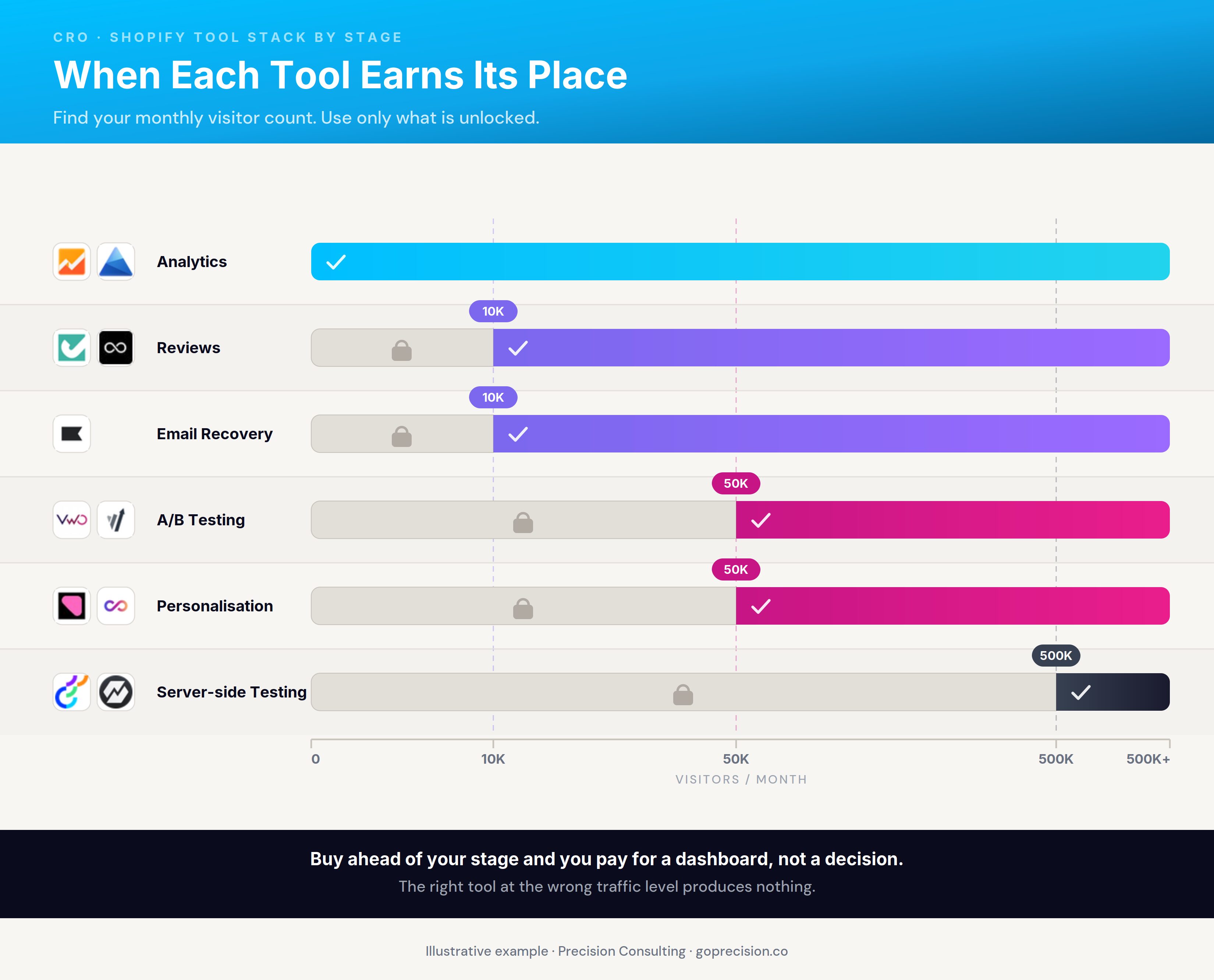
The right Shopify CRO stack expands by stage, not by ambition. Each tool earns its place at the traffic level that supports it.
Which tools belong at Stage 2 (10,000 to 50,000 visitors)?
Between 10,000 and 50,000 monthly visitors, the stack expands to include reviews, customer feedback collection, and slightly heavier diagnostic tools. You are still not running A/B tests with statistical confidence, but you are building the operational stack that will support testing once the traffic supports it. The bigger lever at this stage is closing the obvious friction points on the diagnostics surface.
Add a Shopify-native review app
Judge.me, Loox, and Yotpo are the three Shopify-native options. Pick based on what your category actually needs. Judge.me is the cheapest and most operationally simple, best for high-SKU utilitarian categories like home goods, hardware, and accessories, where buyers want a quick credibility signal (does this work, is it well-made, did it arrive on time) more than a visual showcase. Loox is built around customer photo and video reviews, so it is the right call for visual categories like fashion, beauty, jewellery, and home decor, where seeing the product on a real buyer is what closes the sale. Yotpo is the most expensive and earns its cost only when you are using the broader user-generated content, loyalty, and SMS features alongside reviews. For reviews alone, Yotpo is overkill, and the budget is better spent on Judge.me or Loox plus a separate loyalty tool.
Upgrade your diagnostic layer
Lucky Orange and Mida are Shopify-native diagnostic tools worth adding only when you have a specific use case that justifies them. Lucky Orange adds real-time monitoring, live chat, and form analytics on top of what Clarity does, which earns its place if you have an active service team that can intervene with struggling shoppers during peak hours, or a complex form (B2B inquiry, subscription setup, custom-order request) where field-by-field abandonment data shows you which question is killing the conversion. Mida goes deeper on checkout analytics than any other Shopify-native tool, which earns its place when most of your funnel loss is at checkout (not at product page or cart), and you need granular checkout-step data that GA4 and Clarity cannot surface, particularly on stores running heavy Shopify checkout customisation or Shopify Plus extensibility. Without one of these specific use cases, Clarity is still the right call at zero cost.
Add Klaviyo for email and SMS recovery
Email recovery is the highest-ROI channel you have not yet built, and at this stage, the volume of abandoned carts and post-purchase opportunities justifies the spend. The Shopify integration is deep, and the pre-built flows for cart abandonment, browse abandonment, and post-purchase cover most of what you need without custom work.
What is worth spending real time on is the difference between cart abandonment and checkout abandonment, because they are not the same behaviour, and one generic recovery flow for both is the most common reason these programmes underperform. Cart abandoners (added items, never initiated checkout) are in a considering state, often lower intent, and respond to longer, more educational sequences that lead with social proof and reinforce the reasons to buy. Checkout abandoners (initiated checkout, dropped before paying) were high intent and hit a specific friction at the payment screen, so the recovery sequence should be shorter, more transactional, and address that friction directly: lead with the cart contents, confirm shipping upfront, and remove the work of returning to the same step. Build them as two separate Klaviyo sequences with separate triggers and separate messaging. That separation is the difference between a recovery programme that brings back real abandoned revenue and one that just produces an open rate.
Run a quarterly customer survey
Typeform, Tally, or Hotjar's survey tool all work. Five questions sent to recent purchasers, asking what nearly stopped them from buying. The answers are often more honest and more specific than weeks of recording analysis, and they identify friction points that no quantitative tool will surface. The CRO audit checklist covers the friction patterns these surveys most often surface.
What this stack still does not include is a full A/B testing infrastructure. The traffic is not there yet. Save that for the next stage. The work at this stage is closing the diagnosed friction, building the operational basics, and getting the conversion rate to a level where testing produces interpretable results.
This is the kind of analysis we run in a Precision Deep Dive Audit. If you want to see whether your current stack is producing decisions or just dashboards, request your free audit and we will walk through it together.
Which tools belong at Stage 3 (50,000 to 500,000 visitors)?
Between 50,000 and 500,000 monthly visitors, the stack adds proper A/B testing infrastructure, more sophisticated personalisation, and the operational layer that turns testing into a continuous programme. This is the stage at which structured experimentation becomes statistically possible because the traffic finally supports tests that reach significance in a reasonable timeframe. The tool selection reflects that shift from diagnostic-only work to a programme that compounds wins month over month.
A/B testing infrastructure
The honest options are VWO, Convert.com, AB Tasty, and Crazy Egg, with the choice depending on your team and budget. VWO is the strongest all-in-one platform with testing, multivariate testing, personalisation, session recordings, and heatmaps in a single tool. Convert.com is the cleanest option for stores that want serious testing without the full personalisation layer and that need privacy compliance to be airtight. AB Tasty sits between the two in terms of price and feature depth. Crazy Egg is the lighter option that combines A/B testing with heatmaps in a single, more affordable tool. For testing methodology, the A/B testing for founders guide covers how to design tests that produce a usable answer at this traffic level.
On-site search optimisation
Internal site search is one of the highest-intent surfaces on a store and one of the most under-optimised. Searchanise, Boost, and InstantSearch all integrate natively with Shopify and produce conversion lifts on the buyers who search, which are typically your highest-intent visitors. A buyer searching for "linen shirt size 12" already knows what they want. The job is to give them the answer fast.
The operational layer for continuous testing
At Stage 3, the constraint moves from tool capability to operational tempo. You need a hypothesis backlog, a testing calendar, a documented winners list, and a process for turning learning from one test into the design of the next. The tool gives you the maths. The operational layer turns the maths into compounding revenue.
What earning a tool's keep looks like at this stage
A testing platform costs in the low to mid four-figures monthly at this volume. To justify it, a single winning test needs to produce more than the platform's annual cost. At a 2% conversion rate and an average order value of 80 USD, a 1,000-conversion-per-month store generates 80,000 in monthly revenue from converters. A 10% conversion lift is 8,000 in additional monthly revenue, which clears the platform cost in the first winning month. Below that traffic, the same budget spent removing known friction from your checkout or product pages will almost always move faster.
Which tools belong at Stage 4 (500,000+ visitors on Shopify Plus)?
Above 500,000 monthly visitors, particularly on Shopify Plus, the stack adds server-side testing, advanced personalisation, and the developer infrastructure that lets you test on checkout and on flows that visual editors cannot reach. At this stage, the constraint shifts from tool capability to operational capacity to use the tools.
Server-side testing
Optimizely is the historical enterprise leader and remains the deepest platform for stores running serious experimentation programmes. Statsig and GrowthBook are the developer-focused alternatives that have grown rapidly since 2023, with strong free tiers that scale into enterprise pricing for high-volume programmes. Both are built for engineering teams that want feature-flagged, server-side experimentation as part of a continuous deployment workflow. The fit is strongest for Shopify Plus stores with internal engineering capacity.
Advanced personalisation
Kameleoon and Dynamic Yield (now Mastercard-owned) are the personalisation-first alternatives. Both lean heavily into AI-driven personalisation and audience targeting, and both work well for stores where personalisation is a meaningful conversion lever, typically high-SKU stores or stores with strong segmentation between customer types. Nosto and Rebuy are the Shopify-native personalisation options that sit below the enterprise platforms in price and capability. Either one is a reasonable bridge for stores that have outgrown basic recommendation widgets but are not yet ready for Optimizely or Dynamic Yield.
Engineering capacity is the constraint
The trap at this stage is buying enterprise tools without the engineering capacity to use them. An Optimizely contract without a developer who can implement server-side tests is an expensive subscription that produces little. Statsig's generous free tier looks attractive until you realise the implementation requires the same engineering work as a paid platform. The tool should match the team, not the ambition. A store running enterprise tools without enterprise capacity is the same problem as a store running A/B testing tools without 50,000 monthly visitors. The stage of the team has not caught up to the stage of the stack.
Which tools do most stores buy too early?
The tools most stores buy too early are A/B testing platforms, personalisation engines, and enterprise analytics suites. All three of these need a level of traffic and operational maturity that most stores do not have, and buying them early produces a stack that looks sophisticated and produces nothing usable.
A/B testing platforms at sub-10,000 monthly visitors
The most common over-purchase. The traffic is not there to power tests to significance, the operational rhythm to design and ship tests is not in place, and the cost is meaningful relative to what the store is generating. The honest path at low traffic is fixing diagnosed friction without testing, then adding the testing tool when the traffic supports it.
Personalisation engines before you have segments
Personalisation only outperforms a well-designed default experience when there is meaningful behavioural data to personalise on. At low traffic, the segments are too small to personalise reliably, and the cost is too high to justify the limited lift. Personalisation belongs in Stage 3 or Stage 4.
Enterprise analytics suites at low event volume
Stores with sub-50,000 monthly visitors do not need Heap, Amplitude, or Mixpanel for product analytics. GA4 plus Shopify Analytics covers the visibility you need. Enterprise tools earn their place when the volume of events justifies the cost, which is much higher than most stores assume.
How do you build the stack one tool at a time?
Build the stack one tool at a time, validate that each one is producing decisions you can act on within 30 days, and only add the next tool once the previous one is fully integrated into your weekly workflow. Stacking tools faster than you can absorb the data they produce is the failure mode that creates dashboard fatigue and the abandoned subscriptions that follow.
Add tools in the order analytics first, diagnostics second, reviews third
The order that works for most Shopify stores is analytics first, diagnostics second, reviews and email third, A/B testing fourth, and personalisation fifth. Each tool earns its place by producing something the previous one could not, and each one is added only when the traffic and operational capacity to use it are in place.
Audit the stack quarterly and cancel what is not earning its keep
The stores that compound CRO wins are not the ones with the longest tool lists. They are the ones with the tightest tool-to-decision loop. According to the Baymard Institute's checkout research, the friction points that move conversion the most are unexpected costs (48% of cart abandonment) and forced account creation (a further 26%). Tools that surface these patterns weekly earn their place. Tools that report them in a dashboard you open quarterly do not.
For the Shopify-specific settings and theme decisions that work alongside this stack, the Shopify CRO guide covers what to fix at the platform level before adding more tools.
Want help deciding which tools your store should be running right now? See how Precision works with e-commerce brands, or book a free strategy call and we will audit your stack against your stage.
Nir Eyal's Hooked is the clearest articulation of the Fogg Behaviour Model and why CRO tools are useful only at the layer where motivation, ability, and trigger actually meet. For the operational discipline behind a stack that compounds, BJ Fogg's Tiny Habits explains why small, well-instrumented changes outperform sweeping redesigns at every traffic level.
Key Takeaways
- The best CRO tools for Shopify are the ones that match your stage. Buying ahead of your traffic produces dashboards, not returns.
- The Precision stack audit method asks one question of every CRO tool you pay for: What was the last decision it produced? If the answer is none in 90 days, the tool is sitting on the dashboard.
- Stage 1 (under 10,000 monthly visitors): GA4, Microsoft Clarity, Shopify Analytics, and PageSpeed Insights. All free, all sufficient.
- Stage 2 (10,000 to 50,000 visitors): add a Shopify-native review app matched to your category (Judge.me for utilitarian, Loox for visual, Yotpo for UGC and loyalty), upgrade diagnostics with Lucky Orange or Mida only when you have a use case that justifies them, and add Klaviyo with separate cart-abandonment and checkout-abandonment sequences.
- Stage 3 (50,000 to 500,000 visitors): add A/B testing infrastructure (VWO, Convert.com, AB Tasty, or Crazy Egg) and on-site search optimisation. The traffic finally supports tests that reach significance.
- Stage 4 (500,000+ visitors, Shopify Plus): add server-side testing (Optimizely, Statsig, GrowthBook) and advanced personalisation (Kameleoon, Dynamic Yield, Nosto, Rebuy).
- The three tools most stores buy too early are A/B testing platforms, personalisation engines, and enterprise analytics suites. None produces returns at low traffic.
- A tool earns its place when it produces a decision you act on within 30 days. Audit the stack quarterly and cancel anything that has not.
Frequently Asked Questions
What are the best free CRO tools for Shopify?
The best free CRO tools for Shopify are Google Analytics 4 for traffic and funnel data, Microsoft Clarity for heatmaps and session recordings, Shopify's built-in analytics for sales and customer data, and PageSpeed Insights for site performance. Together, they cover diagnostics for stores up to around 10,000 monthly visitors without any subscription cost.
Which Shopify CRO tool should I buy first?
For most stores, the first paid CRO tool worth adding is a review app, around the time you cross 10,000 monthly visitors. Reviews directly affect conversion at the product page stage and operate independently of your testing or diagnostic tools. Pick the app that matches your category. Judge.me for high-SKU utilitarian stores, Loox for visual categories like fashion and beauty, and Yotpo only when you need the broader UGC and loyalty features.
When should I add an A/B testing tool to my Shopify stack?
Add an A/B testing tool when you have at least 50,000 monthly visitors and a stable conversion baseline. Below that threshold, tests cannot reach statistical significance in a reasonable timeframe, and the cost of the tool is rarely justified by the volume of usable results.
Is VWO worth it for Shopify?
VWO is worth it for Shopify stores doing at least 50,000 monthly visitors with the operational capacity to run a structured testing programme. Below that traffic and discipline threshold, the cost is hard to justify because the platform's strengths require more data than the store can generate.
What is the difference between cart abandonment and checkout abandonment recovery?
Cart abandonment recovery targets buyers who added items to the cart but never initiated checkout. They are still in a considering state, so the sequence can be longer and more educational, leading with social proof and reasons to buy. Checkout abandonment recovery targets buyers who initiated checkout but dropped before paying. They were high intent and hit a specific friction. The sequence should be shorter, more transactional, and address the friction directly. Building these as separate flows in Klaviyo is what makes recovery programmes work.
What is the best heatmap tool for Shopify?
For free, Microsoft Clarity is the best heatmap tool for Shopify. It is unlimited, integrates in one click, and includes session recordings and rage-click detection. For paid options, Lucky Orange is the strongest Shopify-native choice when you have an active service team that can intervene with struggling shoppers in real time, or a complex form that needs field-by-field abandonment data. Mida is the strongest when checkout is your biggest funnel loss, and you need granular checkout-step analytics.
Do I need an enterprise CRO tool if I am on Shopify Plus?
Only if you have the engineering capacity to use it. Enterprise tools like Optimizely, Statsig, and GrowthBook deliver real value at scale, but they require server-side implementation and developer time. A Shopify Plus store without internal engineering is usually better served by VWO, AB Tasty, or Convert.com than by an enterprise contract that sits underused.